■ Problem: When cost alerts, optimization recommendations and operations events each land in a different place, the first hour of the morning goes to deciding what to look at first.
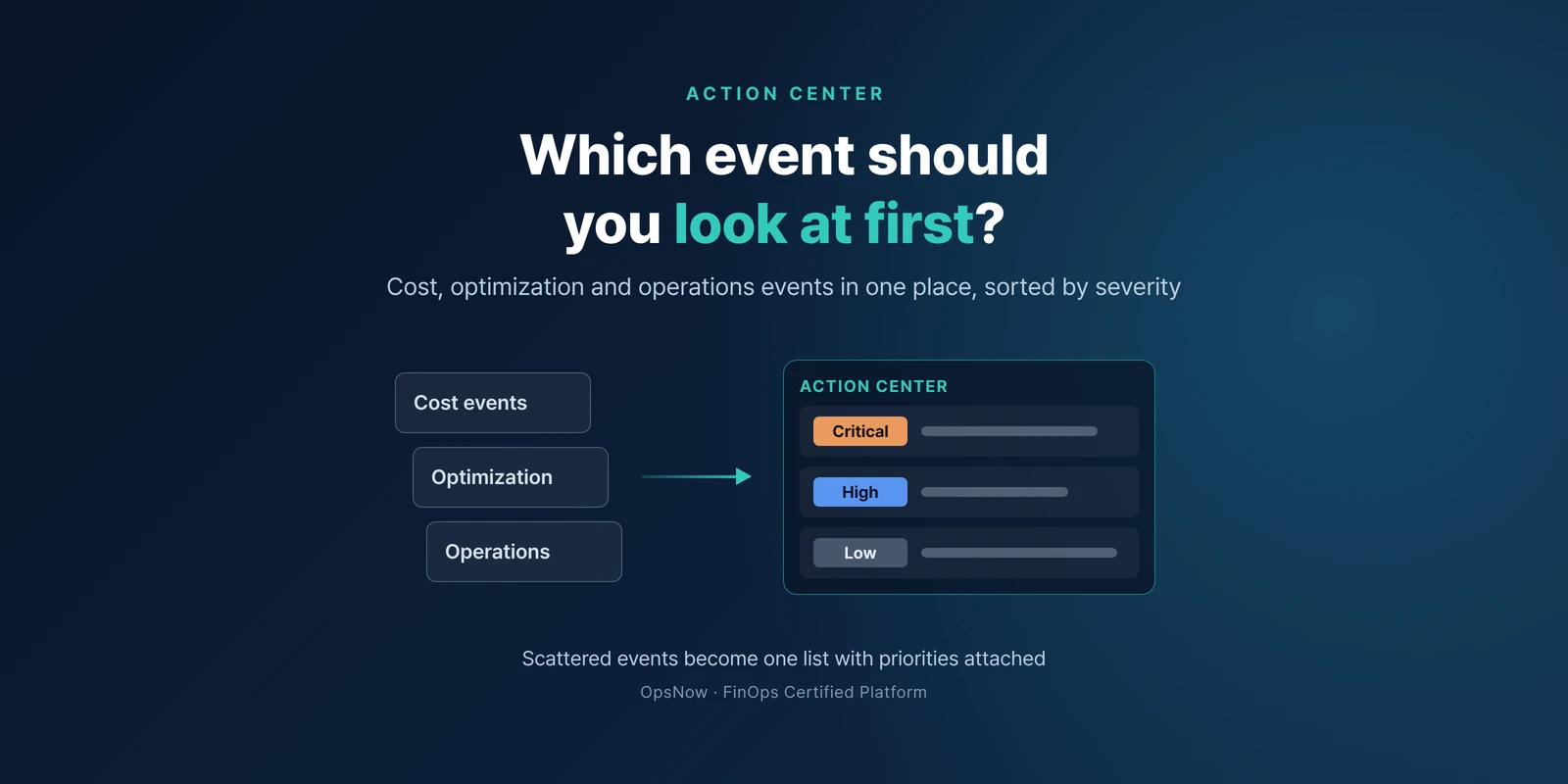
■ Solution: OpsNow Action Center gathers cost, optimization and operations events in one place and sorts them into Critical, High and Low.
■ Result: Instead of ranking urgency by hand across several windows, you open a list that already carries a severity and start with Critical.
It is 9:10 on a Monday morning. The cloud operations lead has budget alerts that piled up over the weekend in the inbox and a few cost anomaly alerts in the chat channel. The lead opens a notepad and starts writing down what to check today.
Nobody has decided yet which of these is the most urgent.
Teams rarely suffer from too few alerts. More often, events of different kinds, such as budgets, cost anomalies and resource status, arrive from different tools in different formats.
Different formats are hard to compare side by side. Is a "warning" in an email subject more urgent than a "caution" in a chat message? In the end a person makes that call, and when that person is on vacation, the call waits too.
OpsNow Action Center brings three types of events into one place: cost, optimization and operations. Each event gets one of three severity levels: Critical, High or Low.
Changes that cross a threshold are detected automatically and show up as events. Ten types of alert rules are available.
Before, the lead opens the inbox, the chat channel and other tools one after another. They estimate how urgent each event is, write an order in the notepad, and work through it item by item. Several windows, one person deciding the order.
After, the same lead opens Action Center. Events are already split into Critical, High and Low. They start with Critical, and Low items can wait for the weekly review. The notepad step disappears.
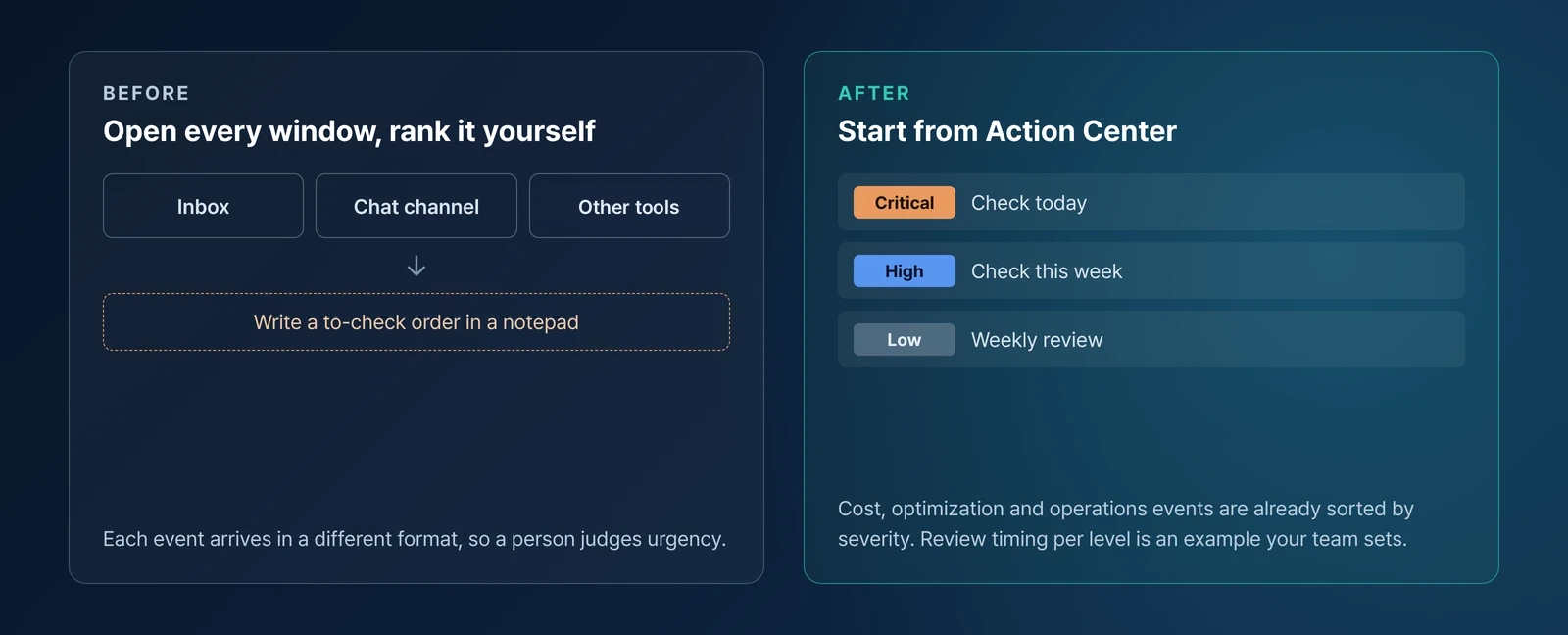
Severity labels alone will not keep the list short. If nobody owns each level, items pile up again. Agree on a simple rule first: Critical the same day, High within the week, Low at the weekly review.
If you want early warning before a budget overrun, see threshold alerts in Budgets. If you are setting up anomaly detection for the first time, see how to find the settings with OpsNow Copilot.
Next Monday at 9:10, that notepad can stay empty. What to look at first is already at the top of the Action Center list.
▶ Talk to OpsNow about your cloud costs
It is a feature that gathers cost, optimization and operations events in one place. Each event is sorted into Critical, High or Low.
Cost, optimization and operations events. Changes that cross a threshold are detected automatically and show up as events.
Ten types of alert rules are available. We can walk through which setup fits your organization in a consultation.

■ Problem: When cost alerts, optimization recommendations and operations events each land in a different place, the first hour of the morning goes to deciding what to look at first.
■ Solution: OpsNow Action Center gathers cost, optimization and operations events in one place and sorts them into Critical, High and Low.
■ Result: Instead of ranking urgency by hand across several windows, you open a list that already carries a severity and start with Critical.
It is 9:10 on a Monday morning. The cloud operations lead has budget alerts that piled up over the weekend in the inbox and a few cost anomaly alerts in the chat channel. The lead opens a notepad and starts writing down what to check today.
Nobody has decided yet which of these is the most urgent.
Teams rarely suffer from too few alerts. More often, events of different kinds, such as budgets, cost anomalies and resource status, arrive from different tools in different formats.
Different formats are hard to compare side by side. Is a "warning" in an email subject more urgent than a "caution" in a chat message? In the end a person makes that call, and when that person is on vacation, the call waits too.
OpsNow Action Center brings three types of events into one place: cost, optimization and operations. Each event gets one of three severity levels: Critical, High or Low.
Changes that cross a threshold are detected automatically and show up as events. Ten types of alert rules are available.
Before, the lead opens the inbox, the chat channel and other tools one after another. They estimate how urgent each event is, write an order in the notepad, and work through it item by item. Several windows, one person deciding the order.
After, the same lead opens Action Center. Events are already split into Critical, High and Low. They start with Critical, and Low items can wait for the weekly review. The notepad step disappears.

Severity labels alone will not keep the list short. If nobody owns each level, items pile up again. Agree on a simple rule first: Critical the same day, High within the week, Low at the weekly review.
If you want early warning before a budget overrun, see threshold alerts in Budgets. If you are setting up anomaly detection for the first time, see how to find the settings with OpsNow Copilot.
Next Monday at 9:10, that notepad can stay empty. What to look at first is already at the top of the Action Center list.
▶ Talk to OpsNow about your cloud costs
It is a feature that gathers cost, optimization and operations events in one place. Each event is sorted into Critical, High or Low.
Cost, optimization and operations events. Changes that cross a threshold are detected automatically and show up as events.
Ten types of alert rules are available. We can walk through which setup fits your organization in a consultation.
■ Problem: When cost alerts, optimization recommendations and operations events each land in a different place, the first hour of the morning goes to deciding what to look at first.
■ Solution: OpsNow Action Center gathers cost, optimization and operations events in one place and sorts them into Critical, High and Low.
■ Result: Instead of ranking urgency by hand across several windows, you open a list that already carries a severity and start with Critical.
It is 9:10 on a Monday morning. The cloud operations lead has budget alerts that piled up over the weekend in the inbox and a few cost anomaly alerts in the chat channel. The lead opens a notepad and starts writing down what to check today.
Nobody has decided yet which of these is the most urgent.
Teams rarely suffer from too few alerts. More often, events of different kinds, such as budgets, cost anomalies and resource status, arrive from different tools in different formats.
Different formats are hard to compare side by side. Is a "warning" in an email subject more urgent than a "caution" in a chat message? In the end a person makes that call, and when that person is on vacation, the call waits too.
OpsNow Action Center brings three types of events into one place: cost, optimization and operations. Each event gets one of three severity levels: Critical, High or Low.
Changes that cross a threshold are detected automatically and show up as events. Ten types of alert rules are available.
Before, the lead opens the inbox, the chat channel and other tools one after another. They estimate how urgent each event is, write an order in the notepad, and work through it item by item. Several windows, one person deciding the order.
After, the same lead opens Action Center. Events are already split into Critical, High and Low. They start with Critical, and Low items can wait for the weekly review. The notepad step disappears.

Severity labels alone will not keep the list short. If nobody owns each level, items pile up again. Agree on a simple rule first: Critical the same day, High within the week, Low at the weekly review.
If you want early warning before a budget overrun, see threshold alerts in Budgets. If you are setting up anomaly detection for the first time, see how to find the settings with OpsNow Copilot.
Next Monday at 9:10, that notepad can stay empty. What to look at first is already at the top of the Action Center list.
▶ Talk to OpsNow about your cloud costs
It is a feature that gathers cost, optimization and operations events in one place. Each event is sorted into Critical, High or Low.
Cost, optimization and operations events. Changes that cross a threshold are detected automatically and show up as events.
Ten types of alert rules are available. We can walk through which setup fits your organization in a consultation.


■ Problem: When cost alerts, optimization recommendations and operations events each land in a different place, the first hour of the morning goes to deciding what to look at first.
■ Solution: OpsNow Action Center gathers cost, optimization and operations events in one place and sorts them into Critical, High and Low.
■ Result: Instead of ranking urgency by hand across several windows, you open a list that already carries a severity and start with Critical.
It is 9:10 on a Monday morning. The cloud operations lead has budget alerts that piled up over the weekend in the inbox and a few cost anomaly alerts in the chat channel. The lead opens a notepad and starts writing down what to check today.
Nobody has decided yet which of these is the most urgent.
Teams rarely suffer from too few alerts. More often, events of different kinds, such as budgets, cost anomalies and resource status, arrive from different tools in different formats.
Different formats are hard to compare side by side. Is a "warning" in an email subject more urgent than a "caution" in a chat message? In the end a person makes that call, and when that person is on vacation, the call waits too.
OpsNow Action Center brings three types of events into one place: cost, optimization and operations. Each event gets one of three severity levels: Critical, High or Low.
Changes that cross a threshold are detected automatically and show up as events. Ten types of alert rules are available.
Before, the lead opens the inbox, the chat channel and other tools one after another. They estimate how urgent each event is, write an order in the notepad, and work through it item by item. Several windows, one person deciding the order.
After, the same lead opens Action Center. Events are already split into Critical, High and Low. They start with Critical, and Low items can wait for the weekly review. The notepad step disappears.

Severity labels alone will not keep the list short. If nobody owns each level, items pile up again. Agree on a simple rule first: Critical the same day, High within the week, Low at the weekly review.
If you want early warning before a budget overrun, see threshold alerts in Budgets. If you are setting up anomaly detection for the first time, see how to find the settings with OpsNow Copilot.
Next Monday at 9:10, that notepad can stay empty. What to look at first is already at the top of the Action Center list.
▶ Talk to OpsNow about your cloud costs
It is a feature that gathers cost, optimization and operations events in one place. Each event is sorted into Critical, High or Low.
Cost, optimization and operations events. Changes that cross a threshold are detected automatically and show up as events.
Ten types of alert rules are available. We can walk through which setup fits your organization in a consultation.

■ Problem: When cost alerts, optimization recommendations and operations events each land in a different place, the first hour of the morning goes to deciding what to look at first.
■ Solution: OpsNow Action Center gathers cost, optimization and operations events in one place and sorts them into Critical, High and Low.
■ Result: Instead of ranking urgency by hand across several windows, you open a list that already carries a severity and start with Critical.
It is 9:10 on a Monday morning. The cloud operations lead has budget alerts that piled up over the weekend in the inbox and a few cost anomaly alerts in the chat channel. The lead opens a notepad and starts writing down what to check today.
Nobody has decided yet which of these is the most urgent.
Teams rarely suffer from too few alerts. More often, events of different kinds, such as budgets, cost anomalies and resource status, arrive from different tools in different formats.
Different formats are hard to compare side by side. Is a "warning" in an email subject more urgent than a "caution" in a chat message? In the end a person makes that call, and when that person is on vacation, the call waits too.
OpsNow Action Center brings three types of events into one place: cost, optimization and operations. Each event gets one of three severity levels: Critical, High or Low.
Changes that cross a threshold are detected automatically and show up as events. Ten types of alert rules are available.
Before, the lead opens the inbox, the chat channel and other tools one after another. They estimate how urgent each event is, write an order in the notepad, and work through it item by item. Several windows, one person deciding the order.
After, the same lead opens Action Center. Events are already split into Critical, High and Low. They start with Critical, and Low items can wait for the weekly review. The notepad step disappears.

Severity labels alone will not keep the list short. If nobody owns each level, items pile up again. Agree on a simple rule first: Critical the same day, High within the week, Low at the weekly review.
If you want early warning before a budget overrun, see threshold alerts in Budgets. If you are setting up anomaly detection for the first time, see how to find the settings with OpsNow Copilot.
Next Monday at 9:10, that notepad can stay empty. What to look at first is already at the top of the Action Center list.
▶ Talk to OpsNow about your cloud costs
It is a feature that gathers cost, optimization and operations events in one place. Each event is sorted into Critical, High or Low.
Cost, optimization and operations events. Changes that cross a threshold are detected automatically and show up as events.
Ten types of alert rules are available. We can walk through which setup fits your organization in a consultation.

■ Problem: When cost alerts, optimization recommendations and operations events each land in a different place, the first hour of the morning goes to deciding what to look at first.
■ Solution: OpsNow Action Center gathers cost, optimization and operations events in one place and sorts them into Critical, High and Low.
■ Result: Instead of ranking urgency by hand across several windows, you open a list that already carries a severity and start with Critical.
It is 9:10 on a Monday morning. The cloud operations lead has budget alerts that piled up over the weekend in the inbox and a few cost anomaly alerts in the chat channel. The lead opens a notepad and starts writing down what to check today.
Nobody has decided yet which of these is the most urgent.
Teams rarely suffer from too few alerts. More often, events of different kinds, such as budgets, cost anomalies and resource status, arrive from different tools in different formats.
Different formats are hard to compare side by side. Is a "warning" in an email subject more urgent than a "caution" in a chat message? In the end a person makes that call, and when that person is on vacation, the call waits too.
OpsNow Action Center brings three types of events into one place: cost, optimization and operations. Each event gets one of three severity levels: Critical, High or Low.
Changes that cross a threshold are detected automatically and show up as events. Ten types of alert rules are available.
Before, the lead opens the inbox, the chat channel and other tools one after another. They estimate how urgent each event is, write an order in the notepad, and work through it item by item. Several windows, one person deciding the order.
After, the same lead opens Action Center. Events are already split into Critical, High and Low. They start with Critical, and Low items can wait for the weekly review. The notepad step disappears.

Severity labels alone will not keep the list short. If nobody owns each level, items pile up again. Agree on a simple rule first: Critical the same day, High within the week, Low at the weekly review.
If you want early warning before a budget overrun, see threshold alerts in Budgets. If you are setting up anomaly detection for the first time, see how to find the settings with OpsNow Copilot.
Next Monday at 9:10, that notepad can stay empty. What to look at first is already at the top of the Action Center list.
▶ Talk to OpsNow about your cloud costs
It is a feature that gathers cost, optimization and operations events in one place. Each event is sorted into Critical, High or Low.
Cost, optimization and operations events. Changes that cross a threshold are detected automatically and show up as events.
Ten types of alert rules are available. We can walk through which setup fits your organization in a consultation.