■ Problem: When cloud budget management is tied to the monthly bill, overspending only shows up after the bill arrives. By then the money is spent.
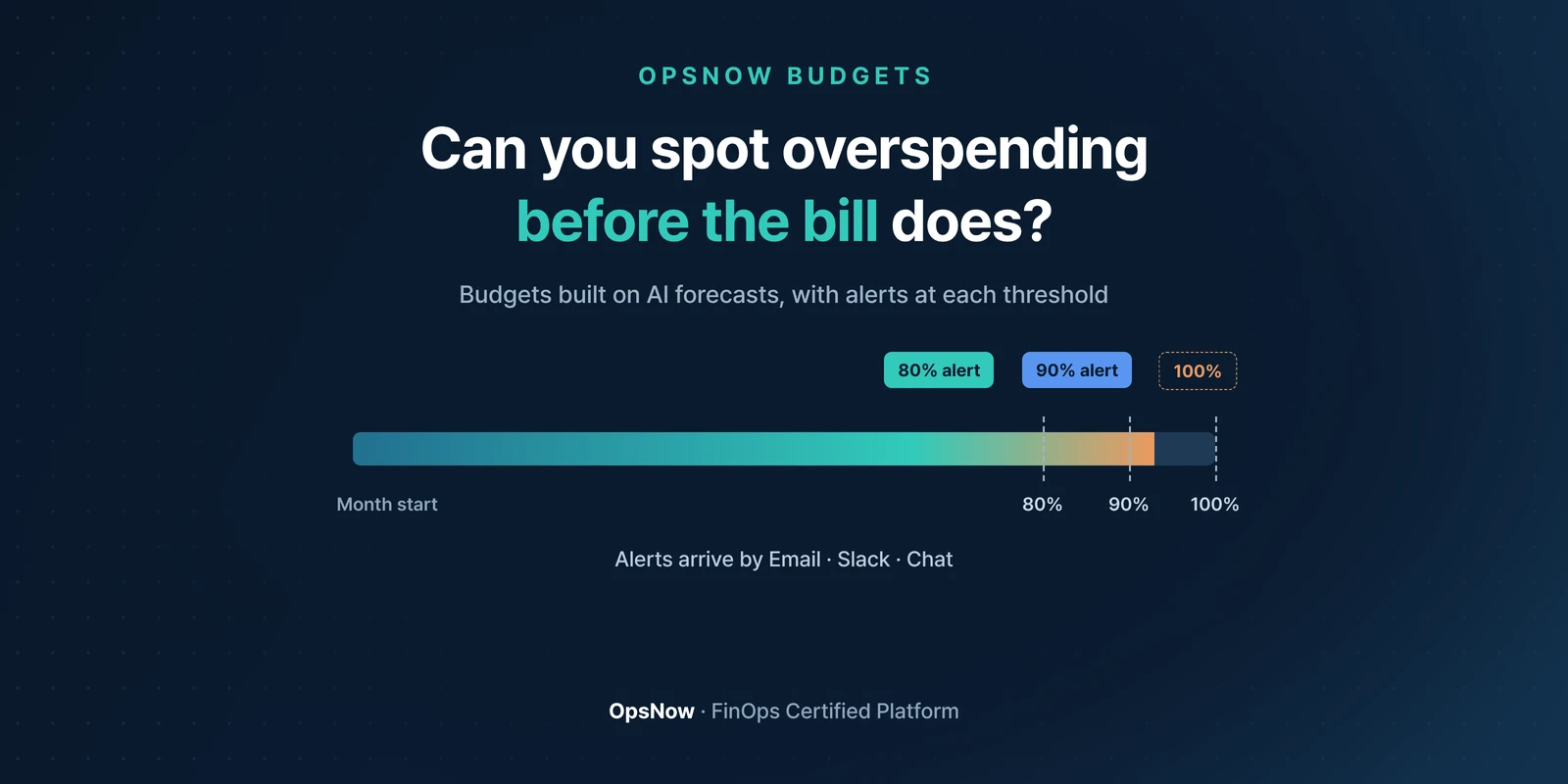
■ Solution: OpsNow Budgets forecasts cost with AI and alerts you by Email, Slack and Chat each time spending reaches 80, 90 and 100% of the budget.
■ Result: You see where you stand against the budget mid-month, before the bill, and buy time to respond.
On the 3rd of the next month, last month's cloud bill lands in the finance team's inbox. It's 18% over budget. The cause turns out to be a test cluster launched in the second week that was still running. For three weeks. Nobody shut it down after the test ended.
Before asking whose fault it was, ask this: was there a way to know in the second week?
Cloud charges build up every day, but the bill comes once a month. If your team tracks the budget in a spreadsheet, the point where you compare it with actual spend is also after the bill.
Developers don't look at the budget sheet when they launch resources, and finance doesn't look at the resource list. Three to four weeks go by in between. That's why cloud budget management keeps ending up as an after-the-fact report.
Budgets forecasts cost with AI. With a forecast to work from, setting a budget relies less on gut feel.
Budgets can be set up hierarchically.
When spending reaches 80% of the budget, the first alert goes out. Another at 90%, and a final one at 100%.
Alerts come by Email, Slack and Chat. If they arrive in a channel your team checks every day, that test cluster from the opening would have stood out the day the 80% alert went off.
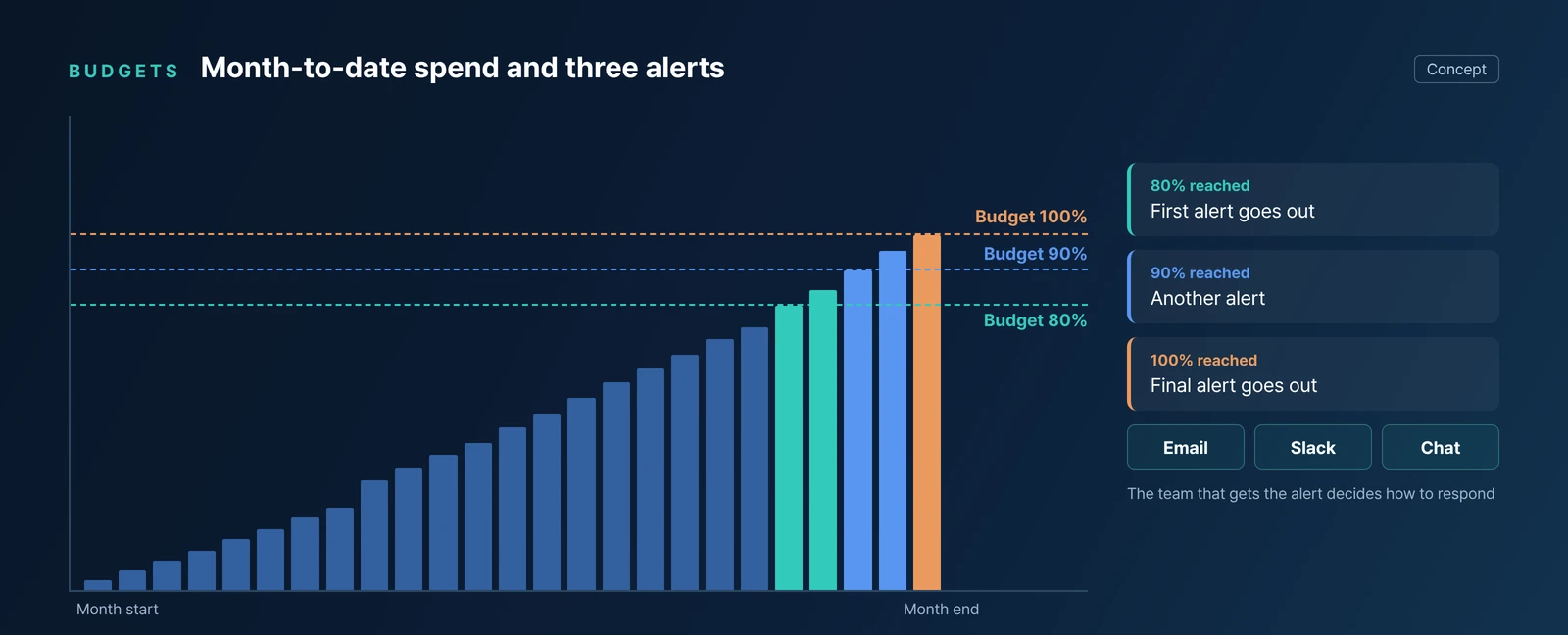
The alerts don't stop spending on their own. People decide whether to stop or raise the budget. The difference is that they make that call from an alert, not from a bill.
OpsNow FinOps KPIs tracks Budget Tracking in real time, alongside Savings Rate and Commitment Cost. If you're still working out how to set the budget in the first place, see our post on AI cost budgets.
Back to that bill. In the month it ran 18% over, the 80% alert would have gone off sometime in the second week. Shutting down one cluster after that alert would have taken a few minutes.
▶ Talk to OpsNow about your cloud costs
When spending reaches 80%, 90% and 100% of the budget. Email, Slack and Chat are supported as alert channels.
You can use the cost Budgets forecasts with AI as a reference. Budgets can be set up hierarchically.
FinOps KPIs tracks Budget Tracking in real time, along with Savings Rate, Commitment Cost and more.

■ Problem: When cloud budget management is tied to the monthly bill, overspending only shows up after the bill arrives. By then the money is spent.
■ Solution: OpsNow Budgets forecasts cost with AI and alerts you by Email, Slack and Chat each time spending reaches 80, 90 and 100% of the budget.
■ Result: You see where you stand against the budget mid-month, before the bill, and buy time to respond.
On the 3rd of the next month, last month's cloud bill lands in the finance team's inbox. It's 18% over budget. The cause turns out to be a test cluster launched in the second week that was still running. For three weeks. Nobody shut it down after the test ended.
Before asking whose fault it was, ask this: was there a way to know in the second week?
Cloud charges build up every day, but the bill comes once a month. If your team tracks the budget in a spreadsheet, the point where you compare it with actual spend is also after the bill.
Developers don't look at the budget sheet when they launch resources, and finance doesn't look at the resource list. Three to four weeks go by in between. That's why cloud budget management keeps ending up as an after-the-fact report.
Budgets forecasts cost with AI. With a forecast to work from, setting a budget relies less on gut feel.
Budgets can be set up hierarchically.
When spending reaches 80% of the budget, the first alert goes out. Another at 90%, and a final one at 100%.
Alerts come by Email, Slack and Chat. If they arrive in a channel your team checks every day, that test cluster from the opening would have stood out the day the 80% alert went off.

The alerts don't stop spending on their own. People decide whether to stop or raise the budget. The difference is that they make that call from an alert, not from a bill.
OpsNow FinOps KPIs tracks Budget Tracking in real time, alongside Savings Rate and Commitment Cost. If you're still working out how to set the budget in the first place, see our post on AI cost budgets.
Back to that bill. In the month it ran 18% over, the 80% alert would have gone off sometime in the second week. Shutting down one cluster after that alert would have taken a few minutes.
▶ Talk to OpsNow about your cloud costs
When spending reaches 80%, 90% and 100% of the budget. Email, Slack and Chat are supported as alert channels.
You can use the cost Budgets forecasts with AI as a reference. Budgets can be set up hierarchically.
FinOps KPIs tracks Budget Tracking in real time, along with Savings Rate, Commitment Cost and more.
■ Problem: When cloud budget management is tied to the monthly bill, overspending only shows up after the bill arrives. By then the money is spent.
■ Solution: OpsNow Budgets forecasts cost with AI and alerts you by Email, Slack and Chat each time spending reaches 80, 90 and 100% of the budget.
■ Result: You see where you stand against the budget mid-month, before the bill, and buy time to respond.
On the 3rd of the next month, last month's cloud bill lands in the finance team's inbox. It's 18% over budget. The cause turns out to be a test cluster launched in the second week that was still running. For three weeks. Nobody shut it down after the test ended.
Before asking whose fault it was, ask this: was there a way to know in the second week?
Cloud charges build up every day, but the bill comes once a month. If your team tracks the budget in a spreadsheet, the point where you compare it with actual spend is also after the bill.
Developers don't look at the budget sheet when they launch resources, and finance doesn't look at the resource list. Three to four weeks go by in between. That's why cloud budget management keeps ending up as an after-the-fact report.
Budgets forecasts cost with AI. With a forecast to work from, setting a budget relies less on gut feel.
Budgets can be set up hierarchically.
When spending reaches 80% of the budget, the first alert goes out. Another at 90%, and a final one at 100%.
Alerts come by Email, Slack and Chat. If they arrive in a channel your team checks every day, that test cluster from the opening would have stood out the day the 80% alert went off.

The alerts don't stop spending on their own. People decide whether to stop or raise the budget. The difference is that they make that call from an alert, not from a bill.
OpsNow FinOps KPIs tracks Budget Tracking in real time, alongside Savings Rate and Commitment Cost. If you're still working out how to set the budget in the first place, see our post on AI cost budgets.
Back to that bill. In the month it ran 18% over, the 80% alert would have gone off sometime in the second week. Shutting down one cluster after that alert would have taken a few minutes.
▶ Talk to OpsNow about your cloud costs
When spending reaches 80%, 90% and 100% of the budget. Email, Slack and Chat are supported as alert channels.
You can use the cost Budgets forecasts with AI as a reference. Budgets can be set up hierarchically.
FinOps KPIs tracks Budget Tracking in real time, along with Savings Rate, Commitment Cost and more.


■ Problem: When cloud budget management is tied to the monthly bill, overspending only shows up after the bill arrives. By then the money is spent.
■ Solution: OpsNow Budgets forecasts cost with AI and alerts you by Email, Slack and Chat each time spending reaches 80, 90 and 100% of the budget.
■ Result: You see where you stand against the budget mid-month, before the bill, and buy time to respond.
On the 3rd of the next month, last month's cloud bill lands in the finance team's inbox. It's 18% over budget. The cause turns out to be a test cluster launched in the second week that was still running. For three weeks. Nobody shut it down after the test ended.
Before asking whose fault it was, ask this: was there a way to know in the second week?
Cloud charges build up every day, but the bill comes once a month. If your team tracks the budget in a spreadsheet, the point where you compare it with actual spend is also after the bill.
Developers don't look at the budget sheet when they launch resources, and finance doesn't look at the resource list. Three to four weeks go by in between. That's why cloud budget management keeps ending up as an after-the-fact report.
Budgets forecasts cost with AI. With a forecast to work from, setting a budget relies less on gut feel.
Budgets can be set up hierarchically.
When spending reaches 80% of the budget, the first alert goes out. Another at 90%, and a final one at 100%.
Alerts come by Email, Slack and Chat. If they arrive in a channel your team checks every day, that test cluster from the opening would have stood out the day the 80% alert went off.

The alerts don't stop spending on their own. People decide whether to stop or raise the budget. The difference is that they make that call from an alert, not from a bill.
OpsNow FinOps KPIs tracks Budget Tracking in real time, alongside Savings Rate and Commitment Cost. If you're still working out how to set the budget in the first place, see our post on AI cost budgets.
Back to that bill. In the month it ran 18% over, the 80% alert would have gone off sometime in the second week. Shutting down one cluster after that alert would have taken a few minutes.
▶ Talk to OpsNow about your cloud costs
When spending reaches 80%, 90% and 100% of the budget. Email, Slack and Chat are supported as alert channels.
You can use the cost Budgets forecasts with AI as a reference. Budgets can be set up hierarchically.
FinOps KPIs tracks Budget Tracking in real time, along with Savings Rate, Commitment Cost and more.

■ Problem: When cloud budget management is tied to the monthly bill, overspending only shows up after the bill arrives. By then the money is spent.
■ Solution: OpsNow Budgets forecasts cost with AI and alerts you by Email, Slack and Chat each time spending reaches 80, 90 and 100% of the budget.
■ Result: You see where you stand against the budget mid-month, before the bill, and buy time to respond.
On the 3rd of the next month, last month's cloud bill lands in the finance team's inbox. It's 18% over budget. The cause turns out to be a test cluster launched in the second week that was still running. For three weeks. Nobody shut it down after the test ended.
Before asking whose fault it was, ask this: was there a way to know in the second week?
Cloud charges build up every day, but the bill comes once a month. If your team tracks the budget in a spreadsheet, the point where you compare it with actual spend is also after the bill.
Developers don't look at the budget sheet when they launch resources, and finance doesn't look at the resource list. Three to four weeks go by in between. That's why cloud budget management keeps ending up as an after-the-fact report.
Budgets forecasts cost with AI. With a forecast to work from, setting a budget relies less on gut feel.
Budgets can be set up hierarchically.
When spending reaches 80% of the budget, the first alert goes out. Another at 90%, and a final one at 100%.
Alerts come by Email, Slack and Chat. If they arrive in a channel your team checks every day, that test cluster from the opening would have stood out the day the 80% alert went off.

The alerts don't stop spending on their own. People decide whether to stop or raise the budget. The difference is that they make that call from an alert, not from a bill.
OpsNow FinOps KPIs tracks Budget Tracking in real time, alongside Savings Rate and Commitment Cost. If you're still working out how to set the budget in the first place, see our post on AI cost budgets.
Back to that bill. In the month it ran 18% over, the 80% alert would have gone off sometime in the second week. Shutting down one cluster after that alert would have taken a few minutes.
▶ Talk to OpsNow about your cloud costs
When spending reaches 80%, 90% and 100% of the budget. Email, Slack and Chat are supported as alert channels.
You can use the cost Budgets forecasts with AI as a reference. Budgets can be set up hierarchically.
FinOps KPIs tracks Budget Tracking in real time, along with Savings Rate, Commitment Cost and more.

■ Problem: When cloud budget management is tied to the monthly bill, overspending only shows up after the bill arrives. By then the money is spent.
■ Solution: OpsNow Budgets forecasts cost with AI and alerts you by Email, Slack and Chat each time spending reaches 80, 90 and 100% of the budget.
■ Result: You see where you stand against the budget mid-month, before the bill, and buy time to respond.
On the 3rd of the next month, last month's cloud bill lands in the finance team's inbox. It's 18% over budget. The cause turns out to be a test cluster launched in the second week that was still running. For three weeks. Nobody shut it down after the test ended.
Before asking whose fault it was, ask this: was there a way to know in the second week?
Cloud charges build up every day, but the bill comes once a month. If your team tracks the budget in a spreadsheet, the point where you compare it with actual spend is also after the bill.
Developers don't look at the budget sheet when they launch resources, and finance doesn't look at the resource list. Three to four weeks go by in between. That's why cloud budget management keeps ending up as an after-the-fact report.
Budgets forecasts cost with AI. With a forecast to work from, setting a budget relies less on gut feel.
Budgets can be set up hierarchically.
When spending reaches 80% of the budget, the first alert goes out. Another at 90%, and a final one at 100%.
Alerts come by Email, Slack and Chat. If they arrive in a channel your team checks every day, that test cluster from the opening would have stood out the day the 80% alert went off.

The alerts don't stop spending on their own. People decide whether to stop or raise the budget. The difference is that they make that call from an alert, not from a bill.
OpsNow FinOps KPIs tracks Budget Tracking in real time, alongside Savings Rate and Commitment Cost. If you're still working out how to set the budget in the first place, see our post on AI cost budgets.
Back to that bill. In the month it ran 18% over, the 80% alert would have gone off sometime in the second week. Shutting down one cluster after that alert would have taken a few minutes.
▶ Talk to OpsNow about your cloud costs
When spending reaches 80%, 90% and 100% of the budget. Email, Slack and Chat are supported as alert channels.
You can use the cost Budgets forecasts with AI as a reference. Budgets can be set up hierarchically.
FinOps KPIs tracks Budget Tracking in real time, along with Savings Rate, Commitment Cost and more.