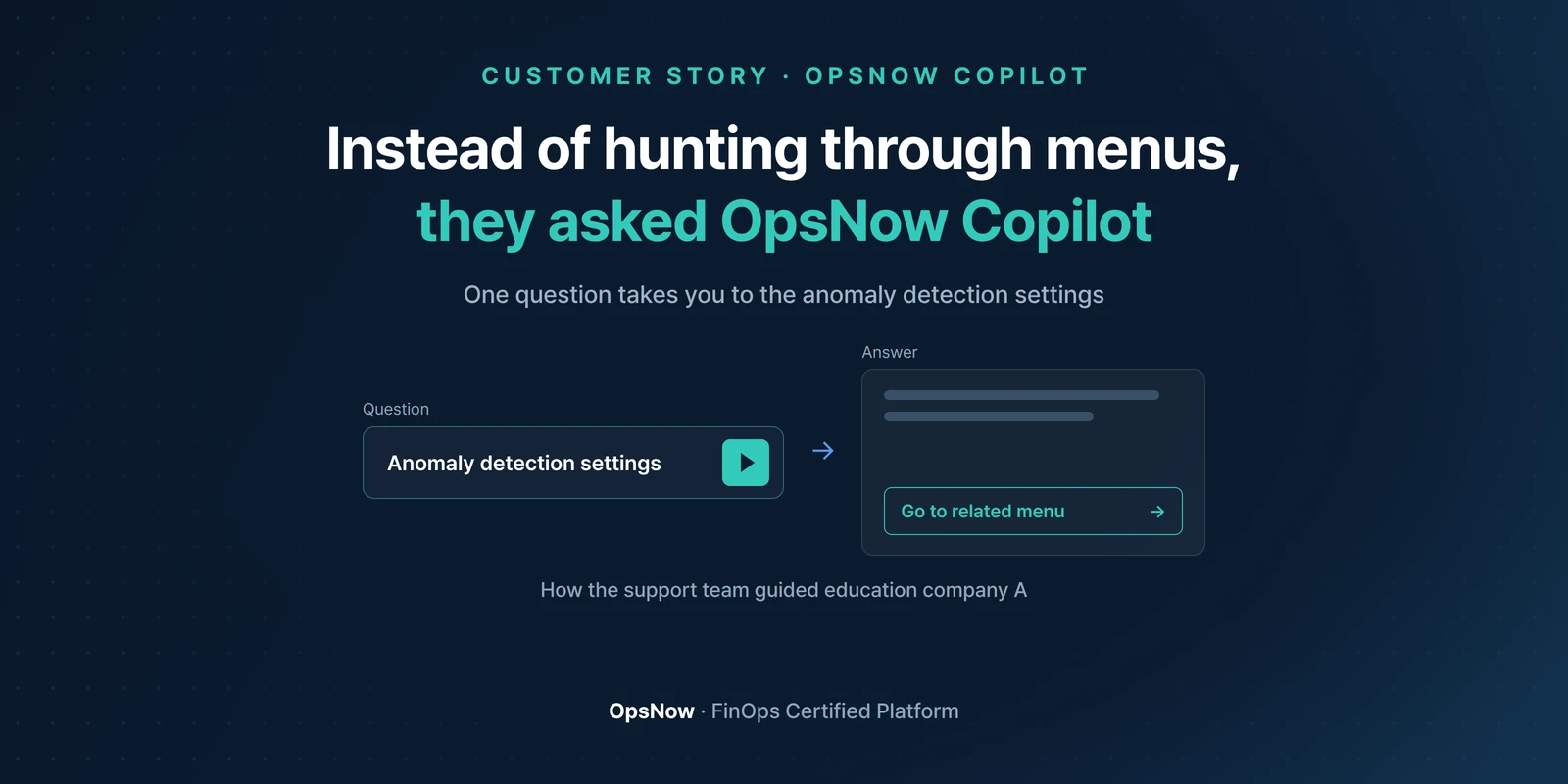
Banner: instead of hunting through menus, they asked OpsNow Copilot; an anomaly detection settings question leads to a shortcut to the related menu
Products

Setting Up Anomaly Detection by Asking OpsNow Copilot

OpsNow Team
2026-10-15

■ Problem: Having an anomaly detection feature doesn't help if it isn't set up. No alerts go out, and when you try to set it up, you get stuck just finding the menu.

■ Solution: Ask OpsNow Copilot to set up anomaly cost detection, and it replies with an explanation and a shortcut to the right menu.

■ Result: No digging through manuals or wandering around screens. You go straight to the anomaly detection settings.

An education company (Company A) running on Google Cloud saw its bill jump without warning. The cause was the Places API used for map search. The first question from the person in charge was this: "We use OpsNow. Why didn't we get an alert beforehand?"

The feature was there. The setting wasn't.

When we checked, OpsNow's anomaly cost detection had never been turned on. Anomaly detection is something you set up yourself. Saving the detection conditions isn't enough on its own. The option to send alerts when an anomaly is detected also has to be on before anyone gets notified.

While no alerts arrive, nothing tells you the setting is missing either. So people go looking for the settings screen only after costs have already spiked.

They tried to set it up, but the menu wasn't there

Company A followed the path they were given. The menu didn't show up, the screenshots they received didn't match their screen, and an error popup appeared.

There were two causes. The screen they were looking at was a different billing screen, not the menu they needed, and only some accounts had permission to see that menu. Several emails went back and forth before the support team adjusted the account permissions. What Company A kept asking for was "a manual customers can refer to."
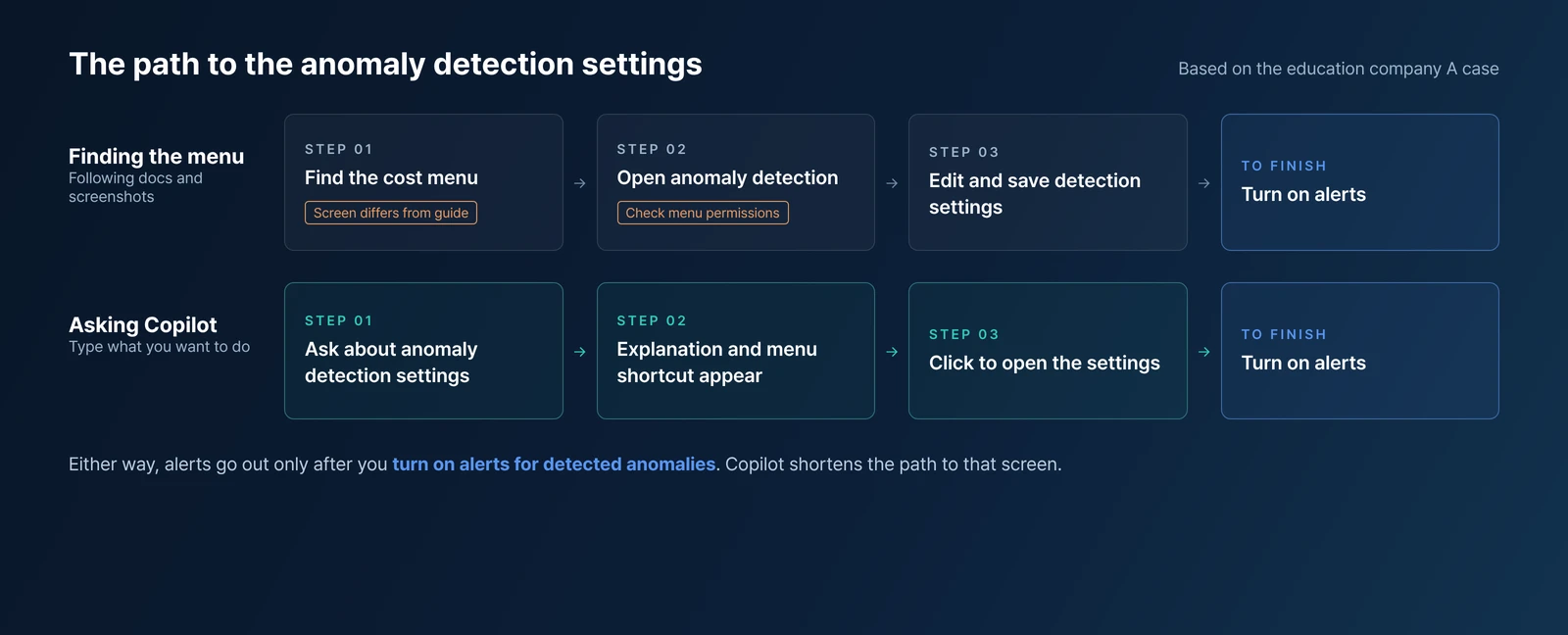
Concept diagram comparing the path of finding the menu yourself with asking OpsNow Copilot and going straight to the settings
Even without knowing the menu path, you can type what you want to do into Copilot and go to that settings screen.

They asked OpsNow Copilot about anomaly detection settings

The support team's final answer wasn't a manual file. It was to type what you want to do straight into the OpsNow Copilot input box.

Ask about setting up anomaly cost detection, and Copilot shows an explanation along with a shortcut to the related menu. Click it and you land on that screen. No need to work out which top-level menu it sits under or whether you're on the right screen.

Not having to memorize menu names makes a real difference. Settings like anomaly detection that you rarely open are easy to lose track of, and that's when people used to reach for the manual. Now they can ask Copilot.

What to check before an alert is ever needed

Working backward from Company A's case, there isn't much to check before costs spike.

  • Make sure your anomaly detection settings are saved
  • Confirm that alerting on detected anomalies is on and the recipients are right
  • If you can't see the settings menu, check account permissions first

Back to Company A's first question. The reason no alert came wasn't the feature. It was the setting. And getting to that settings screen now takes one question.

▶ Talk to OpsNow about your cloud costs

Frequently Asked Questions

Q. Does anomaly cost detection alert us automatically once the feature exists?

No. You need to set up anomaly detection and also turn on the option to send alerts when an anomaly is detected. If either is missing, you won't get an alert even when costs spike.

Q. How should we ask OpsNow Copilot?

Type what you want to do. Ask about anomaly cost detection settings, and you'll get an explanation with a shortcut to the related menu. Click it to go to that screen.

Q. What if the menu we were told about doesn't appear on our screen?

Checking account permissions first is the fastest route. In Company A's case, only some accounts had permission to see the menu, so the support team adjusted it. Also check that the screen you have open is actually the cost menu.

Get Started Today with OpsNow

Banner: instead of hunting through menus, they asked OpsNow Copilot; an anomaly detection settings question leads to a shortcut to the related menu
Products

Setting Up Anomaly Detection by Asking OpsNow Copilot

OpsNow Team
2026-10-15

■ Problem: Having an anomaly detection feature doesn't help if it isn't set up. No alerts go out, and when you try to set it up, you get stuck just finding the menu.

■ Solution: Ask OpsNow Copilot to set up anomaly cost detection, and it replies with an explanation and a shortcut to the right menu.

■ Result: No digging through manuals or wandering around screens. You go straight to the anomaly detection settings.

An education company (Company A) running on Google Cloud saw its bill jump without warning. The cause was the Places API used for map search. The first question from the person in charge was this: "We use OpsNow. Why didn't we get an alert beforehand?"

The feature was there. The setting wasn't.

When we checked, OpsNow's anomaly cost detection had never been turned on. Anomaly detection is something you set up yourself. Saving the detection conditions isn't enough on its own. The option to send alerts when an anomaly is detected also has to be on before anyone gets notified.

While no alerts arrive, nothing tells you the setting is missing either. So people go looking for the settings screen only after costs have already spiked.

They tried to set it up, but the menu wasn't there

Company A followed the path they were given. The menu didn't show up, the screenshots they received didn't match their screen, and an error popup appeared.

There were two causes. The screen they were looking at was a different billing screen, not the menu they needed, and only some accounts had permission to see that menu. Several emails went back and forth before the support team adjusted the account permissions. What Company A kept asking for was "a manual customers can refer to."

Concept diagram comparing the path of finding the menu yourself with asking OpsNow Copilot and going straight to the settings
Even without knowing the menu path, you can type what you want to do into Copilot and go to that settings screen.

They asked OpsNow Copilot about anomaly detection settings

The support team's final answer wasn't a manual file. It was to type what you want to do straight into the OpsNow Copilot input box.

Ask about setting up anomaly cost detection, and Copilot shows an explanation along with a shortcut to the related menu. Click it and you land on that screen. No need to work out which top-level menu it sits under or whether you're on the right screen.

Not having to memorize menu names makes a real difference. Settings like anomaly detection that you rarely open are easy to lose track of, and that's when people used to reach for the manual. Now they can ask Copilot.

What to check before an alert is ever needed

Working backward from Company A's case, there isn't much to check before costs spike.

  • Make sure your anomaly detection settings are saved
  • Confirm that alerting on detected anomalies is on and the recipients are right
  • If you can't see the settings menu, check account permissions first

Back to Company A's first question. The reason no alert came wasn't the feature. It was the setting. And getting to that settings screen now takes one question.

▶ Talk to OpsNow about your cloud costs

Frequently Asked Questions

Q. Does anomaly cost detection alert us automatically once the feature exists?

No. You need to set up anomaly detection and also turn on the option to send alerts when an anomaly is detected. If either is missing, you won't get an alert even when costs spike.

Q. How should we ask OpsNow Copilot?

Type what you want to do. Ask about anomaly cost detection settings, and you'll get an explanation with a shortcut to the related menu. Click it to go to that screen.

Q. What if the menu we were told about doesn't appear on our screen?

Checking account permissions first is the fastest route. In Company A's case, only some accounts had permission to see the menu, so the support team adjusted it. Also check that the screen you have open is actually the cost menu.

Setting Up Anomaly Detection by Asking OpsNow Copilot

■ Problem: Having an anomaly detection feature doesn't help if it isn't set up. No alerts go out, and when you try to set it up, you get stuck just finding the menu.

■ Solution: Ask OpsNow Copilot to set up anomaly cost detection, and it replies with an explanation and a shortcut to the right menu.

■ Result: No digging through manuals or wandering around screens. You go straight to the anomaly detection settings.

An education company (Company A) running on Google Cloud saw its bill jump without warning. The cause was the Places API used for map search. The first question from the person in charge was this: "We use OpsNow. Why didn't we get an alert beforehand?"

The feature was there. The setting wasn't.

When we checked, OpsNow's anomaly cost detection had never been turned on. Anomaly detection is something you set up yourself. Saving the detection conditions isn't enough on its own. The option to send alerts when an anomaly is detected also has to be on before anyone gets notified.

While no alerts arrive, nothing tells you the setting is missing either. So people go looking for the settings screen only after costs have already spiked.

They tried to set it up, but the menu wasn't there

Company A followed the path they were given. The menu didn't show up, the screenshots they received didn't match their screen, and an error popup appeared.

There were two causes. The screen they were looking at was a different billing screen, not the menu they needed, and only some accounts had permission to see that menu. Several emails went back and forth before the support team adjusted the account permissions. What Company A kept asking for was "a manual customers can refer to."

Concept diagram comparing the path of finding the menu yourself with asking OpsNow Copilot and going straight to the settings
Even without knowing the menu path, you can type what you want to do into Copilot and go to that settings screen.

They asked OpsNow Copilot about anomaly detection settings

The support team's final answer wasn't a manual file. It was to type what you want to do straight into the OpsNow Copilot input box.

Ask about setting up anomaly cost detection, and Copilot shows an explanation along with a shortcut to the related menu. Click it and you land on that screen. No need to work out which top-level menu it sits under or whether you're on the right screen.

Not having to memorize menu names makes a real difference. Settings like anomaly detection that you rarely open are easy to lose track of, and that's when people used to reach for the manual. Now they can ask Copilot.

What to check before an alert is ever needed

Working backward from Company A's case, there isn't much to check before costs spike.

  • Make sure your anomaly detection settings are saved
  • Confirm that alerting on detected anomalies is on and the recipients are right
  • If you can't see the settings menu, check account permissions first

Back to Company A's first question. The reason no alert came wasn't the feature. It was the setting. And getting to that settings screen now takes one question.

▶ Talk to OpsNow about your cloud costs

Frequently Asked Questions

Q. Does anomaly cost detection alert us automatically once the feature exists?

No. You need to set up anomaly detection and also turn on the option to send alerts when an anomaly is detected. If either is missing, you won't get an alert even when costs spike.

Q. How should we ask OpsNow Copilot?

Type what you want to do. Ask about anomaly cost detection settings, and you'll get an explanation with a shortcut to the related menu. Click it to go to that screen.

Q. What if the menu we were told about doesn't appear on our screen?

Checking account permissions first is the fastest route. In Company A's case, only some accounts had permission to see the menu, so the support team adjusted it. Also check that the screen you have open is actually the cost menu.

Download it for free
Submit the information below and get the files you need right away
Name *
Company *
Business Email *
By registering an inquiry, you agree to allow OpsNow to store and process your information for contact purposes.
Please read our Privacy Policy for more information.
Thank you.
The file has been downloaded.
Please enter all required fields.
Banner: instead of hunting through menus, they asked OpsNow Copilot; an anomaly detection settings question leads to a shortcut to the related menu

Setting Up Anomaly Detection by Asking OpsNow Copilot

OpsNow Team
2026-10-15

■ Problem: Having an anomaly detection feature doesn't help if it isn't set up. No alerts go out, and when you try to set it up, you get stuck just finding the menu.

■ Solution: Ask OpsNow Copilot to set up anomaly cost detection, and it replies with an explanation and a shortcut to the right menu.

■ Result: No digging through manuals or wandering around screens. You go straight to the anomaly detection settings.

An education company (Company A) running on Google Cloud saw its bill jump without warning. The cause was the Places API used for map search. The first question from the person in charge was this: "We use OpsNow. Why didn't we get an alert beforehand?"

The feature was there. The setting wasn't.

When we checked, OpsNow's anomaly cost detection had never been turned on. Anomaly detection is something you set up yourself. Saving the detection conditions isn't enough on its own. The option to send alerts when an anomaly is detected also has to be on before anyone gets notified.

While no alerts arrive, nothing tells you the setting is missing either. So people go looking for the settings screen only after costs have already spiked.

They tried to set it up, but the menu wasn't there

Company A followed the path they were given. The menu didn't show up, the screenshots they received didn't match their screen, and an error popup appeared.

There were two causes. The screen they were looking at was a different billing screen, not the menu they needed, and only some accounts had permission to see that menu. Several emails went back and forth before the support team adjusted the account permissions. What Company A kept asking for was "a manual customers can refer to."

Concept diagram comparing the path of finding the menu yourself with asking OpsNow Copilot and going straight to the settings
Even without knowing the menu path, you can type what you want to do into Copilot and go to that settings screen.

They asked OpsNow Copilot about anomaly detection settings

The support team's final answer wasn't a manual file. It was to type what you want to do straight into the OpsNow Copilot input box.

Ask about setting up anomaly cost detection, and Copilot shows an explanation along with a shortcut to the related menu. Click it and you land on that screen. No need to work out which top-level menu it sits under or whether you're on the right screen.

Not having to memorize menu names makes a real difference. Settings like anomaly detection that you rarely open are easy to lose track of, and that's when people used to reach for the manual. Now they can ask Copilot.

What to check before an alert is ever needed

Working backward from Company A's case, there isn't much to check before costs spike.

  • Make sure your anomaly detection settings are saved
  • Confirm that alerting on detected anomalies is on and the recipients are right
  • If you can't see the settings menu, check account permissions first

Back to Company A's first question. The reason no alert came wasn't the feature. It was the setting. And getting to that settings screen now takes one question.

▶ Talk to OpsNow about your cloud costs

Frequently Asked Questions

Q. Does anomaly cost detection alert us automatically once the feature exists?

No. You need to set up anomaly detection and also turn on the option to send alerts when an anomaly is detected. If either is missing, you won't get an alert even when costs spike.

Q. How should we ask OpsNow Copilot?

Type what you want to do. Ask about anomaly cost detection settings, and you'll get an explanation with a shortcut to the related menu. Click it to go to that screen.

Q. What if the menu we were told about doesn't appear on our screen?

Checking account permissions first is the fastest route. In Company A's case, only some accounts had permission to see the menu, so the support team adjusted it. Also check that the screen you have open is actually the cost menu.

Setting Up Anomaly Detection by Asking OpsNow Copilot

OpsNow Team
2026-10-15

■ Problem: Having an anomaly detection feature doesn't help if it isn't set up. No alerts go out, and when you try to set it up, you get stuck just finding the menu.

■ Solution: Ask OpsNow Copilot to set up anomaly cost detection, and it replies with an explanation and a shortcut to the right menu.

■ Result: No digging through manuals or wandering around screens. You go straight to the anomaly detection settings.

An education company (Company A) running on Google Cloud saw its bill jump without warning. The cause was the Places API used for map search. The first question from the person in charge was this: "We use OpsNow. Why didn't we get an alert beforehand?"

The feature was there. The setting wasn't.

When we checked, OpsNow's anomaly cost detection had never been turned on. Anomaly detection is something you set up yourself. Saving the detection conditions isn't enough on its own. The option to send alerts when an anomaly is detected also has to be on before anyone gets notified.

While no alerts arrive, nothing tells you the setting is missing either. So people go looking for the settings screen only after costs have already spiked.

They tried to set it up, but the menu wasn't there

Company A followed the path they were given. The menu didn't show up, the screenshots they received didn't match their screen, and an error popup appeared.

There were two causes. The screen they were looking at was a different billing screen, not the menu they needed, and only some accounts had permission to see that menu. Several emails went back and forth before the support team adjusted the account permissions. What Company A kept asking for was "a manual customers can refer to."

Concept diagram comparing the path of finding the menu yourself with asking OpsNow Copilot and going straight to the settings
Even without knowing the menu path, you can type what you want to do into Copilot and go to that settings screen.

They asked OpsNow Copilot about anomaly detection settings

The support team's final answer wasn't a manual file. It was to type what you want to do straight into the OpsNow Copilot input box.

Ask about setting up anomaly cost detection, and Copilot shows an explanation along with a shortcut to the related menu. Click it and you land on that screen. No need to work out which top-level menu it sits under or whether you're on the right screen.

Not having to memorize menu names makes a real difference. Settings like anomaly detection that you rarely open are easy to lose track of, and that's when people used to reach for the manual. Now they can ask Copilot.

What to check before an alert is ever needed

Working backward from Company A's case, there isn't much to check before costs spike.

  • Make sure your anomaly detection settings are saved
  • Confirm that alerting on detected anomalies is on and the recipients are right
  • If you can't see the settings menu, check account permissions first

Back to Company A's first question. The reason no alert came wasn't the feature. It was the setting. And getting to that settings screen now takes one question.

▶ Talk to OpsNow about your cloud costs

Frequently Asked Questions

Q. Does anomaly cost detection alert us automatically once the feature exists?

No. You need to set up anomaly detection and also turn on the option to send alerts when an anomaly is detected. If either is missing, you won't get an alert even when costs spike.

Q. How should we ask OpsNow Copilot?

Type what you want to do. Ask about anomaly cost detection settings, and you'll get an explanation with a shortcut to the related menu. Click it to go to that screen.

Q. What if the menu we were told about doesn't appear on our screen?

Checking account permissions first is the fastest route. In Company A's case, only some accounts had permission to see the menu, so the support team adjusted it. Also check that the screen you have open is actually the cost menu.

Banner: instead of hunting through menus, they asked OpsNow Copilot; an anomaly detection settings question leads to a shortcut to the related menu
Products

Setting Up Anomaly Detection by Asking OpsNow Copilot

OpsNow Team
2026-10-15

■ Problem: Having an anomaly detection feature doesn't help if it isn't set up. No alerts go out, and when you try to set it up, you get stuck just finding the menu.

■ Solution: Ask OpsNow Copilot to set up anomaly cost detection, and it replies with an explanation and a shortcut to the right menu.

■ Result: No digging through manuals or wandering around screens. You go straight to the anomaly detection settings.

An education company (Company A) running on Google Cloud saw its bill jump without warning. The cause was the Places API used for map search. The first question from the person in charge was this: "We use OpsNow. Why didn't we get an alert beforehand?"

The feature was there. The setting wasn't.

When we checked, OpsNow's anomaly cost detection had never been turned on. Anomaly detection is something you set up yourself. Saving the detection conditions isn't enough on its own. The option to send alerts when an anomaly is detected also has to be on before anyone gets notified.

While no alerts arrive, nothing tells you the setting is missing either. So people go looking for the settings screen only after costs have already spiked.

They tried to set it up, but the menu wasn't there

Company A followed the path they were given. The menu didn't show up, the screenshots they received didn't match their screen, and an error popup appeared.

There were two causes. The screen they were looking at was a different billing screen, not the menu they needed, and only some accounts had permission to see that menu. Several emails went back and forth before the support team adjusted the account permissions. What Company A kept asking for was "a manual customers can refer to."

Concept diagram comparing the path of finding the menu yourself with asking OpsNow Copilot and going straight to the settings
Even without knowing the menu path, you can type what you want to do into Copilot and go to that settings screen.

They asked OpsNow Copilot about anomaly detection settings

The support team's final answer wasn't a manual file. It was to type what you want to do straight into the OpsNow Copilot input box.

Ask about setting up anomaly cost detection, and Copilot shows an explanation along with a shortcut to the related menu. Click it and you land on that screen. No need to work out which top-level menu it sits under or whether you're on the right screen.

Not having to memorize menu names makes a real difference. Settings like anomaly detection that you rarely open are easy to lose track of, and that's when people used to reach for the manual. Now they can ask Copilot.

What to check before an alert is ever needed

Working backward from Company A's case, there isn't much to check before costs spike.

  • Make sure your anomaly detection settings are saved
  • Confirm that alerting on detected anomalies is on and the recipients are right
  • If you can't see the settings menu, check account permissions first

Back to Company A's first question. The reason no alert came wasn't the feature. It was the setting. And getting to that settings screen now takes one question.

▶ Talk to OpsNow about your cloud costs

Frequently Asked Questions

Q. Does anomaly cost detection alert us automatically once the feature exists?

No. You need to set up anomaly detection and also turn on the option to send alerts when an anomaly is detected. If either is missing, you won't get an alert even when costs spike.

Q. How should we ask OpsNow Copilot?

Type what you want to do. Ask about anomaly cost detection settings, and you'll get an explanation with a shortcut to the related menu. Click it to go to that screen.

Q. What if the menu we were told about doesn't appear on our screen?

Checking account permissions first is the fastest route. In Company A's case, only some accounts had permission to see the menu, so the support team adjusted it. Also check that the screen you have open is actually the cost menu.