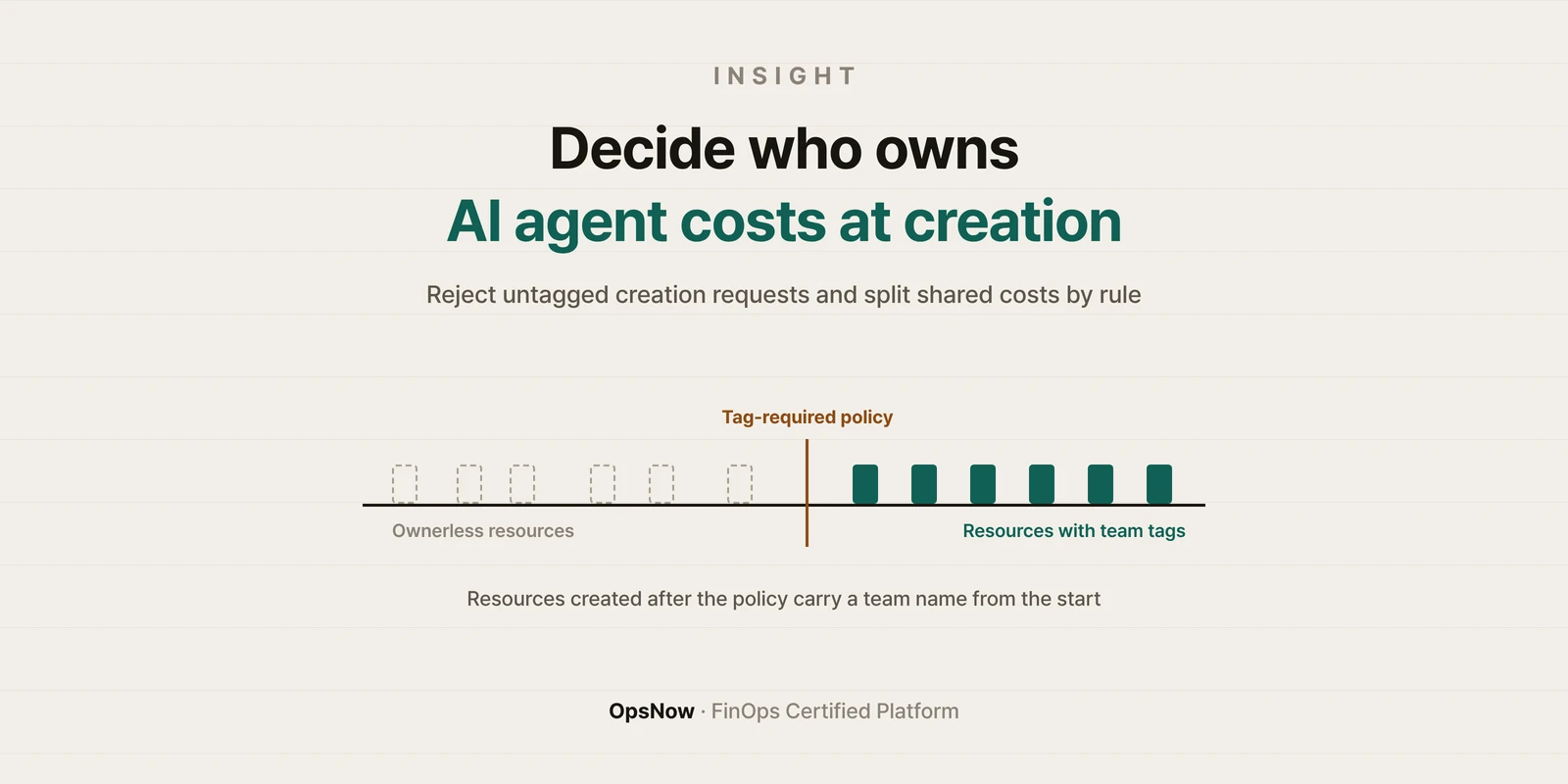
Banner: deciding who owns AI agent costs at creation, with team tags appearing on resources after a tag-required policy
Insight

AI Agent Cost Allocation: Decide the Owner When Resources Are Created

OpsNow Team
2026-10-08

■ Problem: When AI agents create resources under one shared IAM role, the bill shows only the role name. Which team and which task the cost belongs to is blank, and AI agent cost allocation turns into month-end detective work.

■ Solution: Don't hunt for the owner after the fact. Build it into the creation conditions. Reject creation requests without an owner tag, and turn on creator records.

■ Result: Ownerless costs don't pile up as the number of agents grows, and only the shared costs that tags can't split need allocation rules.

Monday morning's cost report shows four GPU instances nobody recognizes. The creator field shows a single value: the role name agent-runner after AssumedRole. Three agents use that role, and two teams gave those agents their work. Whose cost is it?

Why AI agent cost allocation gets hard

When a person creates a resource, there's a trail: the account they logged in with, a request ticket, a chat thread. Cost owners have pieced those together to find who's responsible.

Agents are different. They usually get a single service role, call APIs directly and create and delete resources dozens of times a day. Who typed the prompt isn't carried in the cloud API request. Unless the agent's code is written to add tags, the resource carries no marker at all.

Creator records are a starting point

AWS provides an AWS-generated cost allocation tag called aws:createdBy. According to the AWS Billing documentation, once it's activated in the management account, resources created afterward record the IAM principal that created them. For roles, the access key and role session name are recorded too.

The same documentation lists the limits. The tag only applies to resources created after activation, only certain regions and services are supported, and AWS itself describes it as best-effort. Most importantly, if three agents share one role, all three agents' resources get the same value.

At a minimum, put the agent and task identifiers in each agent's role session name. Then the creator record can stand in for the human trail.

Reject creation requests without tags

The more reliable approach is to make the information you need for allocation a condition of creation. The AWS IAM documentation explains that the aws:RequestTag and aws:TagKeys condition keys control which tag keys and values a request must include. Require owner-team and task tags in the agent role's policy, and any creation request missing them ends in a permissions error.

The FinOps Foundation's definition of the Allocation capability points the same way. It describes the highest level, Run, as enforcing owner and metadata fields as a precondition for provisioning.

For people, that kind of enforcement is friction. For an agent, it's one more condition. Note in the tool description that the agent should add the tags and retry when it gets a denial.

Flow diagram: an AI agent's resource creation request passes a tag condition check and is either created or rejected, while shared costs are split by allocation rules
Only requests with an owner tag become resources. Shared costs that tags can't split are divided by allocation rules.

Costs that tags can't split

A GPU cluster or inference endpoint shared by several agents can't be assigned with a single tag. That share has to be split with an allocation rule, such as by usage ratio. We covered how to split shared costs in allocating cloud costs down to the last shared dollar.

The same Allocation definition also calls for reports that surface spend not split by allocation metadata. For agent costs, that report shows where your policy is leaking. Tag Manager in OpsNow FinOps brings tag status from many accounts onto one screen, so you can first check which accounts are missing tags.

Back to Monday's four GPU instances. If a team tag had been required on creation, the report would have shown a team name from the start. If the session name had carried a task ID, you'd have seen right away which agent launched them and why.

▶ Talk to OpsNow about your cloud costs

Frequently Asked Questions

Q. How is AI agent cost allocation different from a regular tagging policy?

The thing creating resources isn't a person. There's no ticket or chat trail to follow, so the tags needed for allocation have to be in the creation request itself.

Q. Is turning on aws:createdBy enough?

No. It only covers resources created after activation, supported regions are limited, and agents sharing one role all get the same value. Use it together with a tag-required policy.

Q. Won't enforcing tags make agent tasks fail?

Without tags, yes. That's the point. If the agent's tool description tells it to add the required tags and retry on denial, the work continues.

Get Started Today with OpsNow

Banner: deciding who owns AI agent costs at creation, with team tags appearing on resources after a tag-required policy
Insight

AI Agent Cost Allocation: Decide the Owner When Resources Are Created

OpsNow Team
2026-10-08

■ Problem: When AI agents create resources under one shared IAM role, the bill shows only the role name. Which team and which task the cost belongs to is blank, and AI agent cost allocation turns into month-end detective work.

■ Solution: Don't hunt for the owner after the fact. Build it into the creation conditions. Reject creation requests without an owner tag, and turn on creator records.

■ Result: Ownerless costs don't pile up as the number of agents grows, and only the shared costs that tags can't split need allocation rules.

Monday morning's cost report shows four GPU instances nobody recognizes. The creator field shows a single value: the role name agent-runner after AssumedRole. Three agents use that role, and two teams gave those agents their work. Whose cost is it?

Why AI agent cost allocation gets hard

When a person creates a resource, there's a trail: the account they logged in with, a request ticket, a chat thread. Cost owners have pieced those together to find who's responsible.

Agents are different. They usually get a single service role, call APIs directly and create and delete resources dozens of times a day. Who typed the prompt isn't carried in the cloud API request. Unless the agent's code is written to add tags, the resource carries no marker at all.

Creator records are a starting point

AWS provides an AWS-generated cost allocation tag called aws:createdBy. According to the AWS Billing documentation, once it's activated in the management account, resources created afterward record the IAM principal that created them. For roles, the access key and role session name are recorded too.

The same documentation lists the limits. The tag only applies to resources created after activation, only certain regions and services are supported, and AWS itself describes it as best-effort. Most importantly, if three agents share one role, all three agents' resources get the same value.

At a minimum, put the agent and task identifiers in each agent's role session name. Then the creator record can stand in for the human trail.

Reject creation requests without tags

The more reliable approach is to make the information you need for allocation a condition of creation. The AWS IAM documentation explains that the aws:RequestTag and aws:TagKeys condition keys control which tag keys and values a request must include. Require owner-team and task tags in the agent role's policy, and any creation request missing them ends in a permissions error.

The FinOps Foundation's definition of the Allocation capability points the same way. It describes the highest level, Run, as enforcing owner and metadata fields as a precondition for provisioning.

For people, that kind of enforcement is friction. For an agent, it's one more condition. Note in the tool description that the agent should add the tags and retry when it gets a denial.

Flow diagram: an AI agent's resource creation request passes a tag condition check and is either created or rejected, while shared costs are split by allocation rules
Only requests with an owner tag become resources. Shared costs that tags can't split are divided by allocation rules.

Costs that tags can't split

A GPU cluster or inference endpoint shared by several agents can't be assigned with a single tag. That share has to be split with an allocation rule, such as by usage ratio. We covered how to split shared costs in allocating cloud costs down to the last shared dollar.

The same Allocation definition also calls for reports that surface spend not split by allocation metadata. For agent costs, that report shows where your policy is leaking. Tag Manager in OpsNow FinOps brings tag status from many accounts onto one screen, so you can first check which accounts are missing tags.

Back to Monday's four GPU instances. If a team tag had been required on creation, the report would have shown a team name from the start. If the session name had carried a task ID, you'd have seen right away which agent launched them and why.

▶ Talk to OpsNow about your cloud costs

Frequently Asked Questions

Q. How is AI agent cost allocation different from a regular tagging policy?

The thing creating resources isn't a person. There's no ticket or chat trail to follow, so the tags needed for allocation have to be in the creation request itself.

Q. Is turning on aws:createdBy enough?

No. It only covers resources created after activation, supported regions are limited, and agents sharing one role all get the same value. Use it together with a tag-required policy.

Q. Won't enforcing tags make agent tasks fail?

Without tags, yes. That's the point. If the agent's tool description tells it to add the required tags and retry on denial, the work continues.

AI Agent Cost Allocation: Decide the Owner When Resources Are Created

■ Problem: When AI agents create resources under one shared IAM role, the bill shows only the role name. Which team and which task the cost belongs to is blank, and AI agent cost allocation turns into month-end detective work.

■ Solution: Don't hunt for the owner after the fact. Build it into the creation conditions. Reject creation requests without an owner tag, and turn on creator records.

■ Result: Ownerless costs don't pile up as the number of agents grows, and only the shared costs that tags can't split need allocation rules.

Monday morning's cost report shows four GPU instances nobody recognizes. The creator field shows a single value: the role name agent-runner after AssumedRole. Three agents use that role, and two teams gave those agents their work. Whose cost is it?

Why AI agent cost allocation gets hard

When a person creates a resource, there's a trail: the account they logged in with, a request ticket, a chat thread. Cost owners have pieced those together to find who's responsible.

Agents are different. They usually get a single service role, call APIs directly and create and delete resources dozens of times a day. Who typed the prompt isn't carried in the cloud API request. Unless the agent's code is written to add tags, the resource carries no marker at all.

Creator records are a starting point

AWS provides an AWS-generated cost allocation tag called aws:createdBy. According to the AWS Billing documentation, once it's activated in the management account, resources created afterward record the IAM principal that created them. For roles, the access key and role session name are recorded too.

The same documentation lists the limits. The tag only applies to resources created after activation, only certain regions and services are supported, and AWS itself describes it as best-effort. Most importantly, if three agents share one role, all three agents' resources get the same value.

At a minimum, put the agent and task identifiers in each agent's role session name. Then the creator record can stand in for the human trail.

Reject creation requests without tags

The more reliable approach is to make the information you need for allocation a condition of creation. The AWS IAM documentation explains that the aws:RequestTag and aws:TagKeys condition keys control which tag keys and values a request must include. Require owner-team and task tags in the agent role's policy, and any creation request missing them ends in a permissions error.

The FinOps Foundation's definition of the Allocation capability points the same way. It describes the highest level, Run, as enforcing owner and metadata fields as a precondition for provisioning.

For people, that kind of enforcement is friction. For an agent, it's one more condition. Note in the tool description that the agent should add the tags and retry when it gets a denial.

Flow diagram: an AI agent's resource creation request passes a tag condition check and is either created or rejected, while shared costs are split by allocation rules
Only requests with an owner tag become resources. Shared costs that tags can't split are divided by allocation rules.

Costs that tags can't split

A GPU cluster or inference endpoint shared by several agents can't be assigned with a single tag. That share has to be split with an allocation rule, such as by usage ratio. We covered how to split shared costs in allocating cloud costs down to the last shared dollar.

The same Allocation definition also calls for reports that surface spend not split by allocation metadata. For agent costs, that report shows where your policy is leaking. Tag Manager in OpsNow FinOps brings tag status from many accounts onto one screen, so you can first check which accounts are missing tags.

Back to Monday's four GPU instances. If a team tag had been required on creation, the report would have shown a team name from the start. If the session name had carried a task ID, you'd have seen right away which agent launched them and why.

▶ Talk to OpsNow about your cloud costs

Frequently Asked Questions

Q. How is AI agent cost allocation different from a regular tagging policy?

The thing creating resources isn't a person. There's no ticket or chat trail to follow, so the tags needed for allocation have to be in the creation request itself.

Q. Is turning on aws:createdBy enough?

No. It only covers resources created after activation, supported regions are limited, and agents sharing one role all get the same value. Use it together with a tag-required policy.

Q. Won't enforcing tags make agent tasks fail?

Without tags, yes. That's the point. If the agent's tool description tells it to add the required tags and retry on denial, the work continues.
Download it for free
Submit the information below and get the files you need right away
Name *
Company *
Business Email *
By registering an inquiry, you agree to allow OpsNow to store and process your information for contact purposes.
Please read our Privacy Policy for more information.
Thank you.
The file has been downloaded.
Please enter all required fields.
Banner: deciding who owns AI agent costs at creation, with team tags appearing on resources after a tag-required policy

AI Agent Cost Allocation: Decide the Owner When Resources Are Created

OpsNow Team
2026-10-08

■ Problem: When AI agents create resources under one shared IAM role, the bill shows only the role name. Which team and which task the cost belongs to is blank, and AI agent cost allocation turns into month-end detective work.

■ Solution: Don't hunt for the owner after the fact. Build it into the creation conditions. Reject creation requests without an owner tag, and turn on creator records.

■ Result: Ownerless costs don't pile up as the number of agents grows, and only the shared costs that tags can't split need allocation rules.

Monday morning's cost report shows four GPU instances nobody recognizes. The creator field shows a single value: the role name agent-runner after AssumedRole. Three agents use that role, and two teams gave those agents their work. Whose cost is it?

Why AI agent cost allocation gets hard

When a person creates a resource, there's a trail: the account they logged in with, a request ticket, a chat thread. Cost owners have pieced those together to find who's responsible.

Agents are different. They usually get a single service role, call APIs directly and create and delete resources dozens of times a day. Who typed the prompt isn't carried in the cloud API request. Unless the agent's code is written to add tags, the resource carries no marker at all.

Creator records are a starting point

AWS provides an AWS-generated cost allocation tag called aws:createdBy. According to the AWS Billing documentation, once it's activated in the management account, resources created afterward record the IAM principal that created them. For roles, the access key and role session name are recorded too.

The same documentation lists the limits. The tag only applies to resources created after activation, only certain regions and services are supported, and AWS itself describes it as best-effort. Most importantly, if three agents share one role, all three agents' resources get the same value.

At a minimum, put the agent and task identifiers in each agent's role session name. Then the creator record can stand in for the human trail.

Reject creation requests without tags

The more reliable approach is to make the information you need for allocation a condition of creation. The AWS IAM documentation explains that the aws:RequestTag and aws:TagKeys condition keys control which tag keys and values a request must include. Require owner-team and task tags in the agent role's policy, and any creation request missing them ends in a permissions error.

The FinOps Foundation's definition of the Allocation capability points the same way. It describes the highest level, Run, as enforcing owner and metadata fields as a precondition for provisioning.

For people, that kind of enforcement is friction. For an agent, it's one more condition. Note in the tool description that the agent should add the tags and retry when it gets a denial.

Flow diagram: an AI agent's resource creation request passes a tag condition check and is either created or rejected, while shared costs are split by allocation rules
Only requests with an owner tag become resources. Shared costs that tags can't split are divided by allocation rules.

Costs that tags can't split

A GPU cluster or inference endpoint shared by several agents can't be assigned with a single tag. That share has to be split with an allocation rule, such as by usage ratio. We covered how to split shared costs in allocating cloud costs down to the last shared dollar.

The same Allocation definition also calls for reports that surface spend not split by allocation metadata. For agent costs, that report shows where your policy is leaking. Tag Manager in OpsNow FinOps brings tag status from many accounts onto one screen, so you can first check which accounts are missing tags.

Back to Monday's four GPU instances. If a team tag had been required on creation, the report would have shown a team name from the start. If the session name had carried a task ID, you'd have seen right away which agent launched them and why.

▶ Talk to OpsNow about your cloud costs

Frequently Asked Questions

Q. How is AI agent cost allocation different from a regular tagging policy?

The thing creating resources isn't a person. There's no ticket or chat trail to follow, so the tags needed for allocation have to be in the creation request itself.

Q. Is turning on aws:createdBy enough?

No. It only covers resources created after activation, supported regions are limited, and agents sharing one role all get the same value. Use it together with a tag-required policy.

Q. Won't enforcing tags make agent tasks fail?

Without tags, yes. That's the point. If the agent's tool description tells it to add the required tags and retry on denial, the work continues.

AI Agent Cost Allocation: Decide the Owner When Resources Are Created

OpsNow Team
2026-10-08

■ Problem: When AI agents create resources under one shared IAM role, the bill shows only the role name. Which team and which task the cost belongs to is blank, and AI agent cost allocation turns into month-end detective work.

■ Solution: Don't hunt for the owner after the fact. Build it into the creation conditions. Reject creation requests without an owner tag, and turn on creator records.

■ Result: Ownerless costs don't pile up as the number of agents grows, and only the shared costs that tags can't split need allocation rules.

Monday morning's cost report shows four GPU instances nobody recognizes. The creator field shows a single value: the role name agent-runner after AssumedRole. Three agents use that role, and two teams gave those agents their work. Whose cost is it?

Why AI agent cost allocation gets hard

When a person creates a resource, there's a trail: the account they logged in with, a request ticket, a chat thread. Cost owners have pieced those together to find who's responsible.

Agents are different. They usually get a single service role, call APIs directly and create and delete resources dozens of times a day. Who typed the prompt isn't carried in the cloud API request. Unless the agent's code is written to add tags, the resource carries no marker at all.

Creator records are a starting point

AWS provides an AWS-generated cost allocation tag called aws:createdBy. According to the AWS Billing documentation, once it's activated in the management account, resources created afterward record the IAM principal that created them. For roles, the access key and role session name are recorded too.

The same documentation lists the limits. The tag only applies to resources created after activation, only certain regions and services are supported, and AWS itself describes it as best-effort. Most importantly, if three agents share one role, all three agents' resources get the same value.

At a minimum, put the agent and task identifiers in each agent's role session name. Then the creator record can stand in for the human trail.

Reject creation requests without tags

The more reliable approach is to make the information you need for allocation a condition of creation. The AWS IAM documentation explains that the aws:RequestTag and aws:TagKeys condition keys control which tag keys and values a request must include. Require owner-team and task tags in the agent role's policy, and any creation request missing them ends in a permissions error.

The FinOps Foundation's definition of the Allocation capability points the same way. It describes the highest level, Run, as enforcing owner and metadata fields as a precondition for provisioning.

For people, that kind of enforcement is friction. For an agent, it's one more condition. Note in the tool description that the agent should add the tags and retry when it gets a denial.

Flow diagram: an AI agent's resource creation request passes a tag condition check and is either created or rejected, while shared costs are split by allocation rules
Only requests with an owner tag become resources. Shared costs that tags can't split are divided by allocation rules.

Costs that tags can't split

A GPU cluster or inference endpoint shared by several agents can't be assigned with a single tag. That share has to be split with an allocation rule, such as by usage ratio. We covered how to split shared costs in allocating cloud costs down to the last shared dollar.

The same Allocation definition also calls for reports that surface spend not split by allocation metadata. For agent costs, that report shows where your policy is leaking. Tag Manager in OpsNow FinOps brings tag status from many accounts onto one screen, so you can first check which accounts are missing tags.

Back to Monday's four GPU instances. If a team tag had been required on creation, the report would have shown a team name from the start. If the session name had carried a task ID, you'd have seen right away which agent launched them and why.

▶ Talk to OpsNow about your cloud costs

Frequently Asked Questions

Q. How is AI agent cost allocation different from a regular tagging policy?

The thing creating resources isn't a person. There's no ticket or chat trail to follow, so the tags needed for allocation have to be in the creation request itself.

Q. Is turning on aws:createdBy enough?

No. It only covers resources created after activation, supported regions are limited, and agents sharing one role all get the same value. Use it together with a tag-required policy.

Q. Won't enforcing tags make agent tasks fail?

Without tags, yes. That's the point. If the agent's tool description tells it to add the required tags and retry on denial, the work continues.

Banner: deciding who owns AI agent costs at creation, with team tags appearing on resources after a tag-required policy
Insight

AI Agent Cost Allocation: Decide the Owner When Resources Are Created

OpsNow Team
2026-10-08

■ Problem: When AI agents create resources under one shared IAM role, the bill shows only the role name. Which team and which task the cost belongs to is blank, and AI agent cost allocation turns into month-end detective work.

■ Solution: Don't hunt for the owner after the fact. Build it into the creation conditions. Reject creation requests without an owner tag, and turn on creator records.

■ Result: Ownerless costs don't pile up as the number of agents grows, and only the shared costs that tags can't split need allocation rules.

Monday morning's cost report shows four GPU instances nobody recognizes. The creator field shows a single value: the role name agent-runner after AssumedRole. Three agents use that role, and two teams gave those agents their work. Whose cost is it?

Why AI agent cost allocation gets hard

When a person creates a resource, there's a trail: the account they logged in with, a request ticket, a chat thread. Cost owners have pieced those together to find who's responsible.

Agents are different. They usually get a single service role, call APIs directly and create and delete resources dozens of times a day. Who typed the prompt isn't carried in the cloud API request. Unless the agent's code is written to add tags, the resource carries no marker at all.

Creator records are a starting point

AWS provides an AWS-generated cost allocation tag called aws:createdBy. According to the AWS Billing documentation, once it's activated in the management account, resources created afterward record the IAM principal that created them. For roles, the access key and role session name are recorded too.

The same documentation lists the limits. The tag only applies to resources created after activation, only certain regions and services are supported, and AWS itself describes it as best-effort. Most importantly, if three agents share one role, all three agents' resources get the same value.

At a minimum, put the agent and task identifiers in each agent's role session name. Then the creator record can stand in for the human trail.

Reject creation requests without tags

The more reliable approach is to make the information you need for allocation a condition of creation. The AWS IAM documentation explains that the aws:RequestTag and aws:TagKeys condition keys control which tag keys and values a request must include. Require owner-team and task tags in the agent role's policy, and any creation request missing them ends in a permissions error.

The FinOps Foundation's definition of the Allocation capability points the same way. It describes the highest level, Run, as enforcing owner and metadata fields as a precondition for provisioning.

For people, that kind of enforcement is friction. For an agent, it's one more condition. Note in the tool description that the agent should add the tags and retry when it gets a denial.

Flow diagram: an AI agent's resource creation request passes a tag condition check and is either created or rejected, while shared costs are split by allocation rules
Only requests with an owner tag become resources. Shared costs that tags can't split are divided by allocation rules.

Costs that tags can't split

A GPU cluster or inference endpoint shared by several agents can't be assigned with a single tag. That share has to be split with an allocation rule, such as by usage ratio. We covered how to split shared costs in allocating cloud costs down to the last shared dollar.

The same Allocation definition also calls for reports that surface spend not split by allocation metadata. For agent costs, that report shows where your policy is leaking. Tag Manager in OpsNow FinOps brings tag status from many accounts onto one screen, so you can first check which accounts are missing tags.

Back to Monday's four GPU instances. If a team tag had been required on creation, the report would have shown a team name from the start. If the session name had carried a task ID, you'd have seen right away which agent launched them and why.

▶ Talk to OpsNow about your cloud costs

Frequently Asked Questions

Q. How is AI agent cost allocation different from a regular tagging policy?

The thing creating resources isn't a person. There's no ticket or chat trail to follow, so the tags needed for allocation have to be in the creation request itself.

Q. Is turning on aws:createdBy enough?

No. It only covers resources created after activation, supported regions are limited, and agents sharing one role all get the same value. Use it together with a tag-required policy.

Q. Won't enforcing tags make agent tasks fail?

Without tags, yes. That's the point. If the agent's tool description tells it to add the required tags and retry on denial, the work continues.