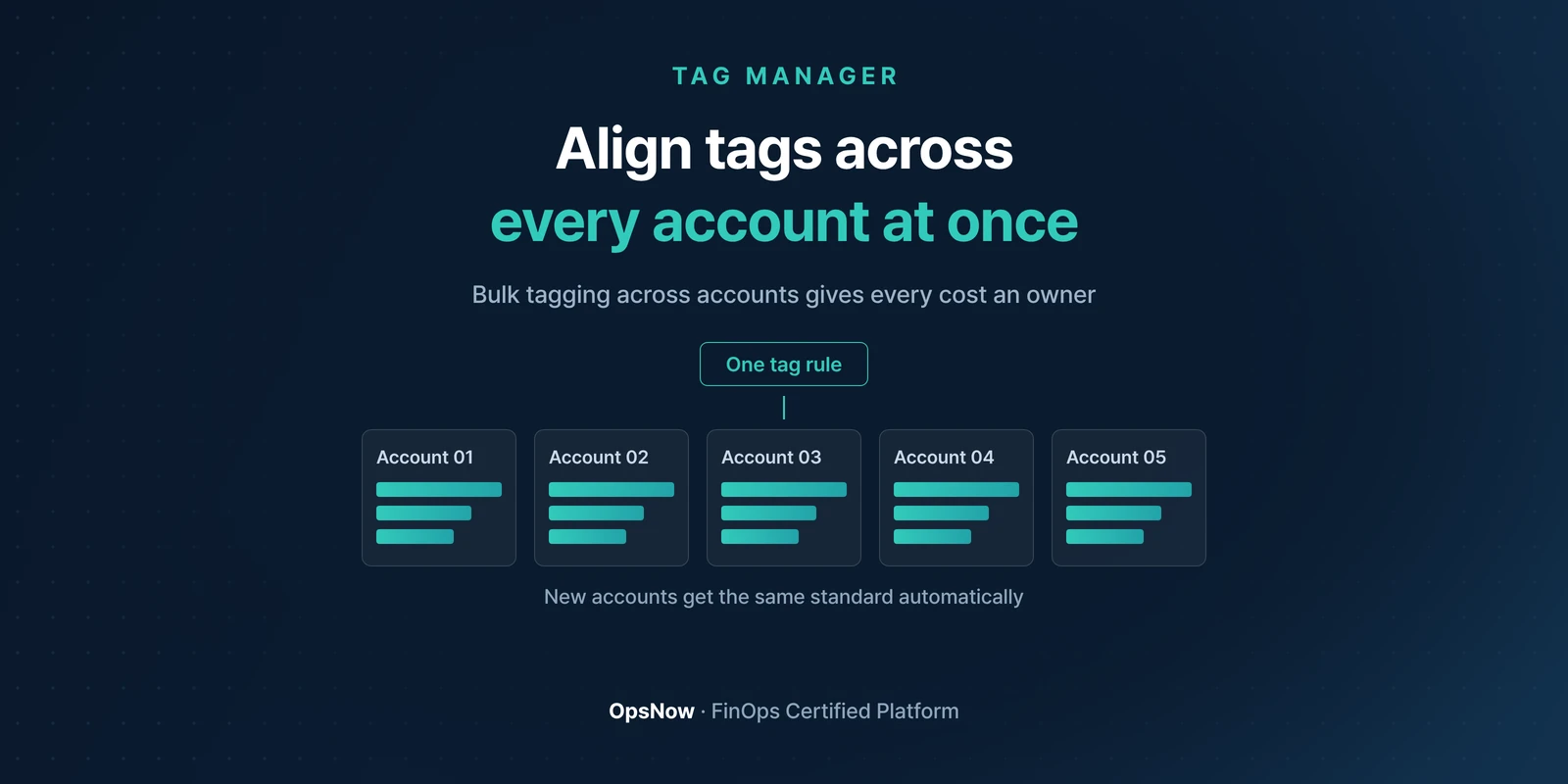
Align tags across every account at once: one tag rule applied to several accounts
Products

Fix Cloud Tags Across Every Account at Once with Tag Manager

OpsNow Team
2026-09-29

■ Problem: Every account follows different tagging rules, so when you try to assign costs to departments, a flood of resources turns up with no owner.

■ Solution: Stop managing cloud tags account by account. In Tag Manager, you add and fix tags across many accounts from a single screen.

■ Result: Fewer missing tags, so costs land on the right department and project.

It's the month-end close. Finance puts up a table that splits the cloud bill by department. At the bottom is a row labeled "Unclassified," and it's longer than any department's row. Nobody can say whose resources those are. They have no tags.

Where tags go missing

Tags tend to drop off in the same places.

  • Instances spun up in the console during an incident, when nobody had time to tag them
  • Resources added by autoscaling, which inherit nothing if the original had no tags
  • Newly added accounts, which don't know the existing rules and start their own way

Even with rules in place, spelling drifts. Team, team and TEAM look the same to a person but are different keys in billing data. One character off, and that resource drops out of the totals.

Cloud tag management from one screen

Tag Manager pulls resources scattered across many accounts into one list. You can filter for resources with empty tags and fill them all at once, and fix inconsistent spellings in the same place. No more opening and closing accounts one by one.

Tags are organized around service groups: department, project, workload. Decide first how you want to split costs, then shape tags to match. Go the other way and tags pile up while the bill stays the same.

When another account is added, the same standard carries straight over. A new team starting its own tagging scheme stops here.

The case of US company N

After adopting Tag Manager, a US company (Company N) raised its tagging rate from 41% to 97–99%. This is a real customer case, and results vary with resource types and the number of accounts.

The rate wasn't the only thing that changed. Fixing and applying a single tag used to take three days. It now takes less than one.
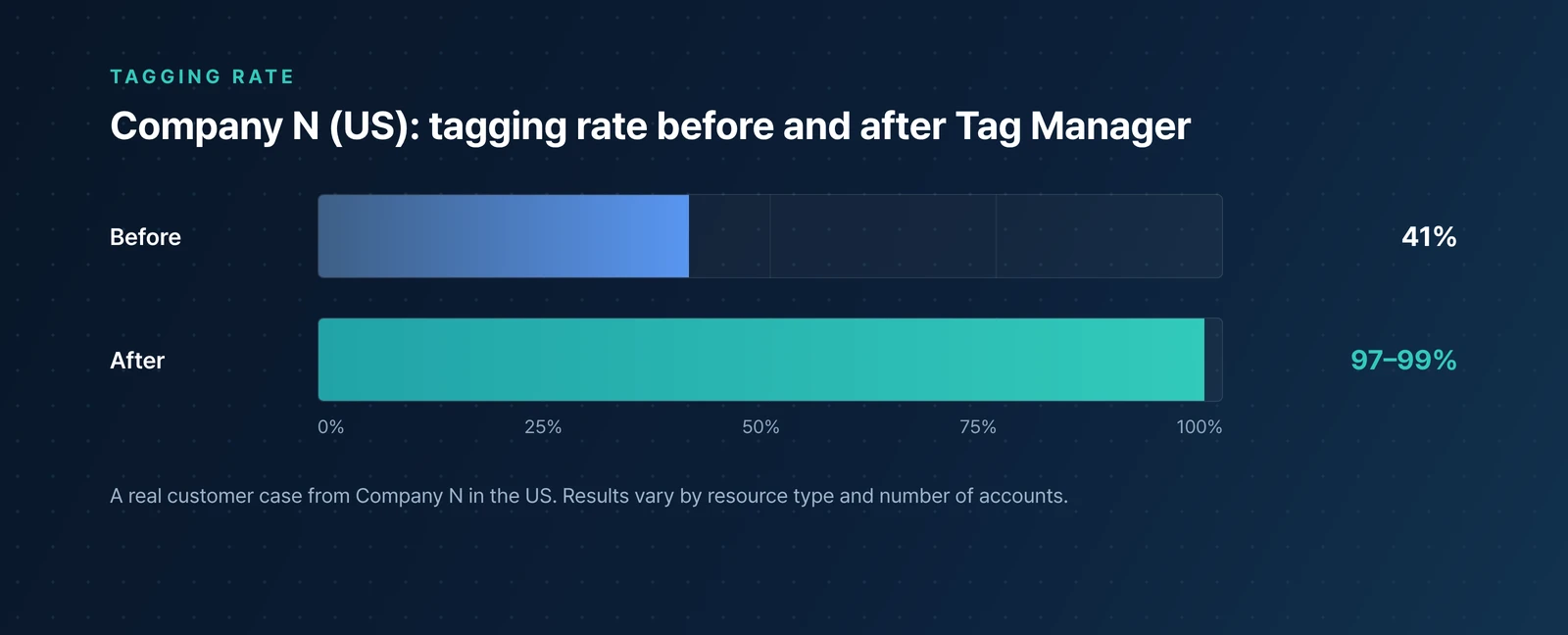
Horizontal bar chart comparing Company N's tagging rate, rising from 41 percent to 97 to 99 percent
A real customer case from Company N in the US, showing the tagging rate before and after.

After the tags are in place

A higher tagging rate opens up the next step. With Shared Cost Rules in Cost Allocation, you can split shared costs and untaggable resources so that 100% of spend is allocated, and you can build department budgets on actual usage. Once costs that sat under "Unclassified" carry a department name, the savings conversation starts with someone who owns them. How to set those budgets is covered in another post.

Back to the month-end close. When the "Unclassified" row gets shorter, the questions in the room change. People stop asking who spent it and start asking why it cost that much.

▶ Talk to OpsNow about your cloud costs

Frequently Asked Questions

Q. Can we tag resources that already exist?

Yes. You filter for resources with empty tags and fill them in at once, so the work doesn't grow at the same rate as the number of accounts.

Q. Is there a standard for setting tag rules?

Start with the units you want to split costs by. Departments, projects and workloads are your service groups, and tags are designed around them.

Q. How high can the tagging rate go?

It depends on the environment. In Company N's real customer case it went from 41% to 97–99%, and billing tag compliance rose from 10% to 90–98% along with it.

Get Started Today with OpsNow

Align tags across every account at once: one tag rule applied to several accounts
Products

Fix Cloud Tags Across Every Account at Once with Tag Manager

OpsNow Team
2026-09-29

■ Problem: Every account follows different tagging rules, so when you try to assign costs to departments, a flood of resources turns up with no owner.

■ Solution: Stop managing cloud tags account by account. In Tag Manager, you add and fix tags across many accounts from a single screen.

■ Result: Fewer missing tags, so costs land on the right department and project.

It's the month-end close. Finance puts up a table that splits the cloud bill by department. At the bottom is a row labeled "Unclassified," and it's longer than any department's row. Nobody can say whose resources those are. They have no tags.

Where tags go missing

Tags tend to drop off in the same places.

  • Instances spun up in the console during an incident, when nobody had time to tag them
  • Resources added by autoscaling, which inherit nothing if the original had no tags
  • Newly added accounts, which don't know the existing rules and start their own way

Even with rules in place, spelling drifts. Team, team and TEAM look the same to a person but are different keys in billing data. One character off, and that resource drops out of the totals.

Cloud tag management from one screen

Tag Manager pulls resources scattered across many accounts into one list. You can filter for resources with empty tags and fill them all at once, and fix inconsistent spellings in the same place. No more opening and closing accounts one by one.

Tags are organized around service groups: department, project, workload. Decide first how you want to split costs, then shape tags to match. Go the other way and tags pile up while the bill stays the same.

When another account is added, the same standard carries straight over. A new team starting its own tagging scheme stops here.

The case of US company N

After adopting Tag Manager, a US company (Company N) raised its tagging rate from 41% to 97–99%. This is a real customer case, and results vary with resource types and the number of accounts.

The rate wasn't the only thing that changed. Fixing and applying a single tag used to take three days. It now takes less than one.

Horizontal bar chart comparing Company N's tagging rate, rising from 41 percent to 97 to 99 percent
A real customer case from Company N in the US, showing the tagging rate before and after.

After the tags are in place

A higher tagging rate opens up the next step. With Shared Cost Rules in Cost Allocation, you can split shared costs and untaggable resources so that 100% of spend is allocated, and you can build department budgets on actual usage. Once costs that sat under "Unclassified" carry a department name, the savings conversation starts with someone who owns them. How to set those budgets is covered in another post.

Back to the month-end close. When the "Unclassified" row gets shorter, the questions in the room change. People stop asking who spent it and start asking why it cost that much.

▶ Talk to OpsNow about your cloud costs

Frequently Asked Questions

Q. Can we tag resources that already exist?

Yes. You filter for resources with empty tags and fill them in at once, so the work doesn't grow at the same rate as the number of accounts.

Q. Is there a standard for setting tag rules?

Start with the units you want to split costs by. Departments, projects and workloads are your service groups, and tags are designed around them.

Q. How high can the tagging rate go?

It depends on the environment. In Company N's real customer case it went from 41% to 97–99%, and billing tag compliance rose from 10% to 90–98% along with it.

Fix Cloud Tags Across Every Account at Once with Tag Manager

■ Problem: Every account follows different tagging rules, so when you try to assign costs to departments, a flood of resources turns up with no owner.

■ Solution: Stop managing cloud tags account by account. In Tag Manager, you add and fix tags across many accounts from a single screen.

■ Result: Fewer missing tags, so costs land on the right department and project.

It's the month-end close. Finance puts up a table that splits the cloud bill by department. At the bottom is a row labeled "Unclassified," and it's longer than any department's row. Nobody can say whose resources those are. They have no tags.

Where tags go missing

Tags tend to drop off in the same places.

  • Instances spun up in the console during an incident, when nobody had time to tag them
  • Resources added by autoscaling, which inherit nothing if the original had no tags
  • Newly added accounts, which don't know the existing rules and start their own way

Even with rules in place, spelling drifts. Team, team and TEAM look the same to a person but are different keys in billing data. One character off, and that resource drops out of the totals.

Cloud tag management from one screen

Tag Manager pulls resources scattered across many accounts into one list. You can filter for resources with empty tags and fill them all at once, and fix inconsistent spellings in the same place. No more opening and closing accounts one by one.

Tags are organized around service groups: department, project, workload. Decide first how you want to split costs, then shape tags to match. Go the other way and tags pile up while the bill stays the same.

When another account is added, the same standard carries straight over. A new team starting its own tagging scheme stops here.

The case of US company N

After adopting Tag Manager, a US company (Company N) raised its tagging rate from 41% to 97–99%. This is a real customer case, and results vary with resource types and the number of accounts.

The rate wasn't the only thing that changed. Fixing and applying a single tag used to take three days. It now takes less than one.

Horizontal bar chart comparing Company N's tagging rate, rising from 41 percent to 97 to 99 percent
A real customer case from Company N in the US, showing the tagging rate before and after.

After the tags are in place

A higher tagging rate opens up the next step. With Shared Cost Rules in Cost Allocation, you can split shared costs and untaggable resources so that 100% of spend is allocated, and you can build department budgets on actual usage. Once costs that sat under "Unclassified" carry a department name, the savings conversation starts with someone who owns them. How to set those budgets is covered in another post.

Back to the month-end close. When the "Unclassified" row gets shorter, the questions in the room change. People stop asking who spent it and start asking why it cost that much.

▶ Talk to OpsNow about your cloud costs

Frequently Asked Questions

Q. Can we tag resources that already exist?

Yes. You filter for resources with empty tags and fill them in at once, so the work doesn't grow at the same rate as the number of accounts.

Q. Is there a standard for setting tag rules?

Start with the units you want to split costs by. Departments, projects and workloads are your service groups, and tags are designed around them.

Q. How high can the tagging rate go?

It depends on the environment. In Company N's real customer case it went from 41% to 97–99%, and billing tag compliance rose from 10% to 90–98% along with it.

Download it for free
Submit the information below and get the files you need right away
Name *
Company *
Business Email *
By registering an inquiry, you agree to allow OpsNow to store and process your information for contact purposes.
Please read our Privacy Policy for more information.
Thank you.
The file has been downloaded.
Please enter all required fields.
Align tags across every account at once: one tag rule applied to several accounts

Fix Cloud Tags Across Every Account at Once with Tag Manager

OpsNow Team
2026-09-29

■ Problem: Every account follows different tagging rules, so when you try to assign costs to departments, a flood of resources turns up with no owner.

■ Solution: Stop managing cloud tags account by account. In Tag Manager, you add and fix tags across many accounts from a single screen.

■ Result: Fewer missing tags, so costs land on the right department and project.

It's the month-end close. Finance puts up a table that splits the cloud bill by department. At the bottom is a row labeled "Unclassified," and it's longer than any department's row. Nobody can say whose resources those are. They have no tags.

Where tags go missing

Tags tend to drop off in the same places.

  • Instances spun up in the console during an incident, when nobody had time to tag them
  • Resources added by autoscaling, which inherit nothing if the original had no tags
  • Newly added accounts, which don't know the existing rules and start their own way

Even with rules in place, spelling drifts. Team, team and TEAM look the same to a person but are different keys in billing data. One character off, and that resource drops out of the totals.

Cloud tag management from one screen

Tag Manager pulls resources scattered across many accounts into one list. You can filter for resources with empty tags and fill them all at once, and fix inconsistent spellings in the same place. No more opening and closing accounts one by one.

Tags are organized around service groups: department, project, workload. Decide first how you want to split costs, then shape tags to match. Go the other way and tags pile up while the bill stays the same.

When another account is added, the same standard carries straight over. A new team starting its own tagging scheme stops here.

The case of US company N

After adopting Tag Manager, a US company (Company N) raised its tagging rate from 41% to 97–99%. This is a real customer case, and results vary with resource types and the number of accounts.

The rate wasn't the only thing that changed. Fixing and applying a single tag used to take three days. It now takes less than one.

Horizontal bar chart comparing Company N's tagging rate, rising from 41 percent to 97 to 99 percent
A real customer case from Company N in the US, showing the tagging rate before and after.

After the tags are in place

A higher tagging rate opens up the next step. With Shared Cost Rules in Cost Allocation, you can split shared costs and untaggable resources so that 100% of spend is allocated, and you can build department budgets on actual usage. Once costs that sat under "Unclassified" carry a department name, the savings conversation starts with someone who owns them. How to set those budgets is covered in another post.

Back to the month-end close. When the "Unclassified" row gets shorter, the questions in the room change. People stop asking who spent it and start asking why it cost that much.

▶ Talk to OpsNow about your cloud costs

Frequently Asked Questions

Q. Can we tag resources that already exist?

Yes. You filter for resources with empty tags and fill them in at once, so the work doesn't grow at the same rate as the number of accounts.

Q. Is there a standard for setting tag rules?

Start with the units you want to split costs by. Departments, projects and workloads are your service groups, and tags are designed around them.

Q. How high can the tagging rate go?

It depends on the environment. In Company N's real customer case it went from 41% to 97–99%, and billing tag compliance rose from 10% to 90–98% along with it.

Fix Cloud Tags Across Every Account at Once with Tag Manager

OpsNow Team
2026-09-29

■ Problem: Every account follows different tagging rules, so when you try to assign costs to departments, a flood of resources turns up with no owner.

■ Solution: Stop managing cloud tags account by account. In Tag Manager, you add and fix tags across many accounts from a single screen.

■ Result: Fewer missing tags, so costs land on the right department and project.

It's the month-end close. Finance puts up a table that splits the cloud bill by department. At the bottom is a row labeled "Unclassified," and it's longer than any department's row. Nobody can say whose resources those are. They have no tags.

Where tags go missing

Tags tend to drop off in the same places.

  • Instances spun up in the console during an incident, when nobody had time to tag them
  • Resources added by autoscaling, which inherit nothing if the original had no tags
  • Newly added accounts, which don't know the existing rules and start their own way

Even with rules in place, spelling drifts. Team, team and TEAM look the same to a person but are different keys in billing data. One character off, and that resource drops out of the totals.

Cloud tag management from one screen

Tag Manager pulls resources scattered across many accounts into one list. You can filter for resources with empty tags and fill them all at once, and fix inconsistent spellings in the same place. No more opening and closing accounts one by one.

Tags are organized around service groups: department, project, workload. Decide first how you want to split costs, then shape tags to match. Go the other way and tags pile up while the bill stays the same.

When another account is added, the same standard carries straight over. A new team starting its own tagging scheme stops here.

The case of US company N

After adopting Tag Manager, a US company (Company N) raised its tagging rate from 41% to 97–99%. This is a real customer case, and results vary with resource types and the number of accounts.

The rate wasn't the only thing that changed. Fixing and applying a single tag used to take three days. It now takes less than one.

Horizontal bar chart comparing Company N's tagging rate, rising from 41 percent to 97 to 99 percent
A real customer case from Company N in the US, showing the tagging rate before and after.

After the tags are in place

A higher tagging rate opens up the next step. With Shared Cost Rules in Cost Allocation, you can split shared costs and untaggable resources so that 100% of spend is allocated, and you can build department budgets on actual usage. Once costs that sat under "Unclassified" carry a department name, the savings conversation starts with someone who owns them. How to set those budgets is covered in another post.

Back to the month-end close. When the "Unclassified" row gets shorter, the questions in the room change. People stop asking who spent it and start asking why it cost that much.

▶ Talk to OpsNow about your cloud costs

Frequently Asked Questions

Q. Can we tag resources that already exist?

Yes. You filter for resources with empty tags and fill them in at once, so the work doesn't grow at the same rate as the number of accounts.

Q. Is there a standard for setting tag rules?

Start with the units you want to split costs by. Departments, projects and workloads are your service groups, and tags are designed around them.

Q. How high can the tagging rate go?

It depends on the environment. In Company N's real customer case it went from 41% to 97–99%, and billing tag compliance rose from 10% to 90–98% along with it.

Align tags across every account at once: one tag rule applied to several accounts
Products

Fix Cloud Tags Across Every Account at Once with Tag Manager

OpsNow Team
2026-09-29

■ Problem: Every account follows different tagging rules, so when you try to assign costs to departments, a flood of resources turns up with no owner.

■ Solution: Stop managing cloud tags account by account. In Tag Manager, you add and fix tags across many accounts from a single screen.

■ Result: Fewer missing tags, so costs land on the right department and project.

It's the month-end close. Finance puts up a table that splits the cloud bill by department. At the bottom is a row labeled "Unclassified," and it's longer than any department's row. Nobody can say whose resources those are. They have no tags.

Where tags go missing

Tags tend to drop off in the same places.

  • Instances spun up in the console during an incident, when nobody had time to tag them
  • Resources added by autoscaling, which inherit nothing if the original had no tags
  • Newly added accounts, which don't know the existing rules and start their own way

Even with rules in place, spelling drifts. Team, team and TEAM look the same to a person but are different keys in billing data. One character off, and that resource drops out of the totals.

Cloud tag management from one screen

Tag Manager pulls resources scattered across many accounts into one list. You can filter for resources with empty tags and fill them all at once, and fix inconsistent spellings in the same place. No more opening and closing accounts one by one.

Tags are organized around service groups: department, project, workload. Decide first how you want to split costs, then shape tags to match. Go the other way and tags pile up while the bill stays the same.

When another account is added, the same standard carries straight over. A new team starting its own tagging scheme stops here.

The case of US company N

After adopting Tag Manager, a US company (Company N) raised its tagging rate from 41% to 97–99%. This is a real customer case, and results vary with resource types and the number of accounts.

The rate wasn't the only thing that changed. Fixing and applying a single tag used to take three days. It now takes less than one.

Horizontal bar chart comparing Company N's tagging rate, rising from 41 percent to 97 to 99 percent
A real customer case from Company N in the US, showing the tagging rate before and after.

After the tags are in place

A higher tagging rate opens up the next step. With Shared Cost Rules in Cost Allocation, you can split shared costs and untaggable resources so that 100% of spend is allocated, and you can build department budgets on actual usage. Once costs that sat under "Unclassified" carry a department name, the savings conversation starts with someone who owns them. How to set those budgets is covered in another post.

Back to the month-end close. When the "Unclassified" row gets shorter, the questions in the room change. People stop asking who spent it and start asking why it cost that much.

▶ Talk to OpsNow about your cloud costs

Frequently Asked Questions

Q. Can we tag resources that already exist?

Yes. You filter for resources with empty tags and fill them in at once, so the work doesn't grow at the same rate as the number of accounts.

Q. Is there a standard for setting tag rules?

Start with the units you want to split costs by. Departments, projects and workloads are your service groups, and tags are designed around them.

Q. How high can the tagging rate go?

It depends on the environment. In Company N's real customer case it went from 41% to 97–99%, and billing tag compliance rose from 10% to 90–98% along with it.