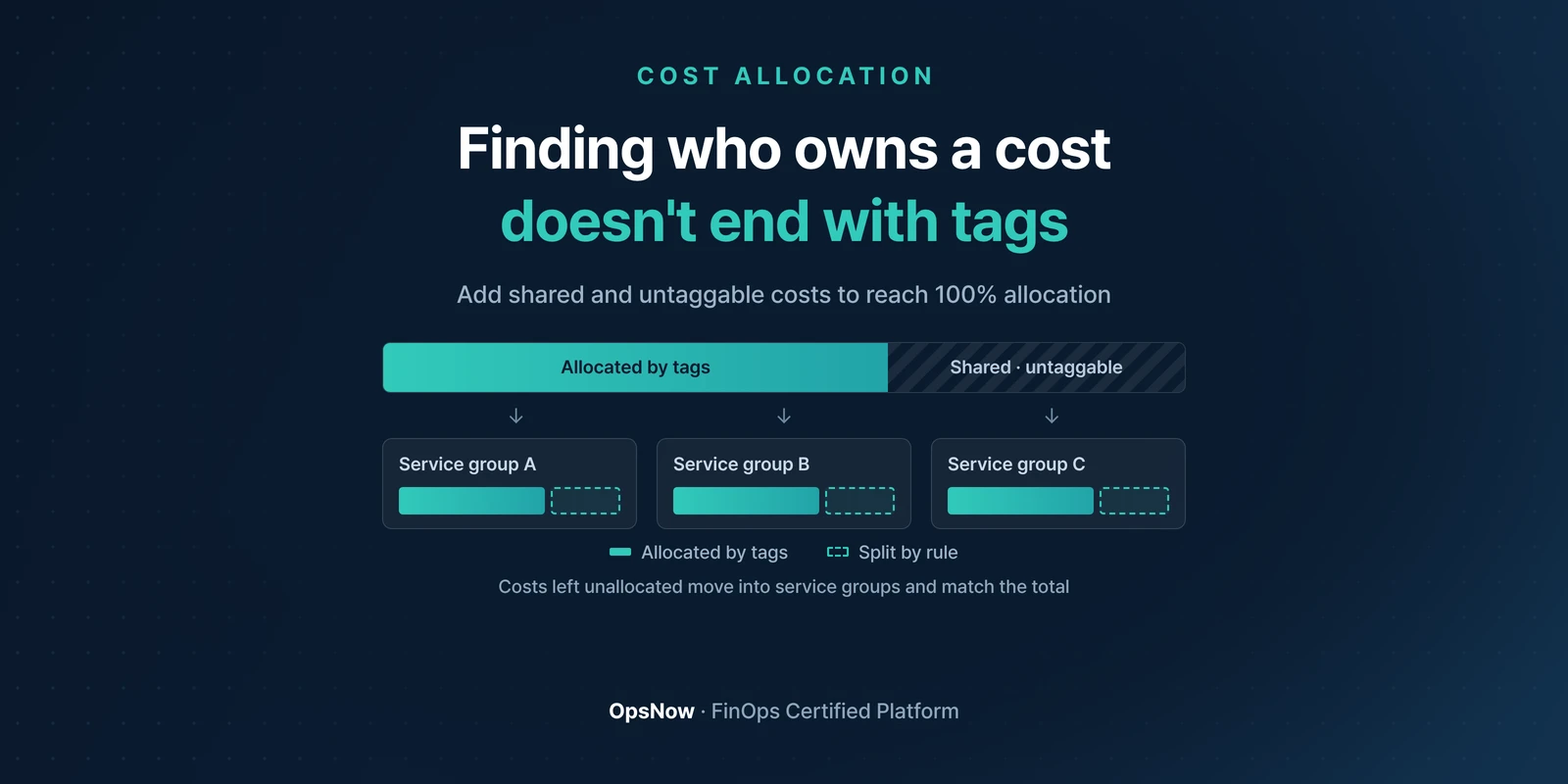
■ Problem: Even with careful tagging, some costs, like NAT gateways and data transfer, are hard to pin on any one team. That's where cloud cost allocation stalls in the last few percent.
■ Solution: OpsNow Cost Allocation uses Shared Cost Rules to distribute shared costs and untaggable resources across service groups.
■ Result: Department totals match the bill. 100% of spend is allocated.
It's the monthly cost review. The platform team lead points at a line on the screen. "Why is this NAT gateway charge on us?" Nobody ever claimed that resource. It landed on the platform team because the account belongs to them. A meeting meant to cut costs spends twenty minutes arguing about ownership.
Tools can raise your tagging rate. We covered aligning tags across scattered accounts with Tag Manager in an earlier post, and US company N took its rate from 41% to 97–99%. That still isn't 100%.
What's left falls into two groups. Shared resources used by several teams: NAT gateways, shared load balancers, the support plan on the management account. And items that can't take a tag in the first place, such as data transfer charges and some marketplace billing, where tags don't attach at the resource level.
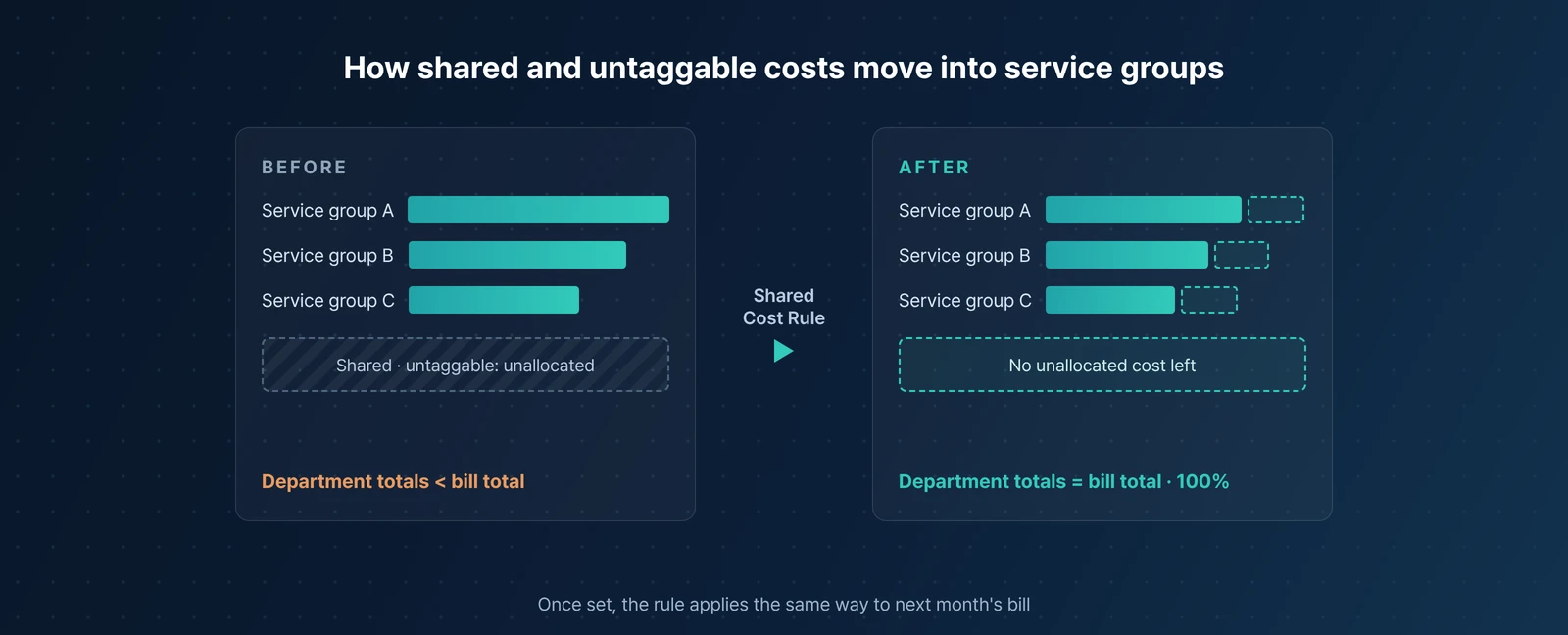
If that chunk doesn't go somewhere, department totals always come up short of the bill. The gap sits in a row called "Other." The bigger "Other" gets, the fewer people trust the table.
OpsNow Cost Allocation groups departments, projects and workloads into service groups, then distributes the costs that tags didn't sort out across those groups. You decide how they're split. You can split them in proportion to usage or apply a ratio your organization agreed on.
Once a rule is set, it applies the same way to next month's bill. This is where the monthly spreadsheet session of splitting costs by hand goes away.
OpsNow also brings cost data from AWS, Azure, GCP, OCI and Naver Cloud into one place, so you aren't reading a different billing format for every cloud.
Once allocation reaches 100%, people read the table differently. The step of doubting the numbers drops out, and they go straight to what went up.
Visibility, allocation, optimization and governance. When OpsNow looks at FinOps through these four pillars, allocation comes second. The reason is simple. Until you know whose cost it is, there's no one to hand optimization to and no one to hold to a policy.
Back to that meeting. The same NAT gateway charge is now split among the teams that generated the traffic, not dumped on the platform team. The lead's question changes too: why did our share go up from last month?
▶ Talk to OpsNow about your cloud costs
Yes. Charges like data transfer can't be tagged at the resource level, and shared resources are hard to assign to one team even when they're tagged. Tagging is a prerequisite for allocation, not allocation itself.
You do. Choose whichever your organization accepts, usage-based or a fixed ratio, and you can set separate rules to match how your service groups are organized.
OpsNow brings cost data from five CSPs (AWS, Azure, GCP, OCI and Naver Cloud) into one place. Supported coverage can differ by feature, so check the details for your environment with the OpsNow team.

■ Problem: Even with careful tagging, some costs, like NAT gateways and data transfer, are hard to pin on any one team. That's where cloud cost allocation stalls in the last few percent.
■ Solution: OpsNow Cost Allocation uses Shared Cost Rules to distribute shared costs and untaggable resources across service groups.
■ Result: Department totals match the bill. 100% of spend is allocated.
It's the monthly cost review. The platform team lead points at a line on the screen. "Why is this NAT gateway charge on us?" Nobody ever claimed that resource. It landed on the platform team because the account belongs to them. A meeting meant to cut costs spends twenty minutes arguing about ownership.
Tools can raise your tagging rate. We covered aligning tags across scattered accounts with Tag Manager in an earlier post, and US company N took its rate from 41% to 97–99%. That still isn't 100%.
What's left falls into two groups. Shared resources used by several teams: NAT gateways, shared load balancers, the support plan on the management account. And items that can't take a tag in the first place, such as data transfer charges and some marketplace billing, where tags don't attach at the resource level.
If that chunk doesn't go somewhere, department totals always come up short of the bill. The gap sits in a row called "Other." The bigger "Other" gets, the fewer people trust the table.
OpsNow Cost Allocation groups departments, projects and workloads into service groups, then distributes the costs that tags didn't sort out across those groups. You decide how they're split. You can split them in proportion to usage or apply a ratio your organization agreed on.
Once a rule is set, it applies the same way to next month's bill. This is where the monthly spreadsheet session of splitting costs by hand goes away.
OpsNow also brings cost data from AWS, Azure, GCP, OCI and Naver Cloud into one place, so you aren't reading a different billing format for every cloud.
Once allocation reaches 100%, people read the table differently. The step of doubting the numbers drops out, and they go straight to what went up.

Visibility, allocation, optimization and governance. When OpsNow looks at FinOps through these four pillars, allocation comes second. The reason is simple. Until you know whose cost it is, there's no one to hand optimization to and no one to hold to a policy.
Back to that meeting. The same NAT gateway charge is now split among the teams that generated the traffic, not dumped on the platform team. The lead's question changes too: why did our share go up from last month?
▶ Talk to OpsNow about your cloud costs
Yes. Charges like data transfer can't be tagged at the resource level, and shared resources are hard to assign to one team even when they're tagged. Tagging is a prerequisite for allocation, not allocation itself.
You do. Choose whichever your organization accepts, usage-based or a fixed ratio, and you can set separate rules to match how your service groups are organized.
OpsNow brings cost data from five CSPs (AWS, Azure, GCP, OCI and Naver Cloud) into one place. Supported coverage can differ by feature, so check the details for your environment with the OpsNow team.
■ Problem: Even with careful tagging, some costs, like NAT gateways and data transfer, are hard to pin on any one team. That's where cloud cost allocation stalls in the last few percent.
■ Solution: OpsNow Cost Allocation uses Shared Cost Rules to distribute shared costs and untaggable resources across service groups.
■ Result: Department totals match the bill. 100% of spend is allocated.
It's the monthly cost review. The platform team lead points at a line on the screen. "Why is this NAT gateway charge on us?" Nobody ever claimed that resource. It landed on the platform team because the account belongs to them. A meeting meant to cut costs spends twenty minutes arguing about ownership.
Tools can raise your tagging rate. We covered aligning tags across scattered accounts with Tag Manager in an earlier post, and US company N took its rate from 41% to 97–99%. That still isn't 100%.
What's left falls into two groups. Shared resources used by several teams: NAT gateways, shared load balancers, the support plan on the management account. And items that can't take a tag in the first place, such as data transfer charges and some marketplace billing, where tags don't attach at the resource level.
If that chunk doesn't go somewhere, department totals always come up short of the bill. The gap sits in a row called "Other." The bigger "Other" gets, the fewer people trust the table.
OpsNow Cost Allocation groups departments, projects and workloads into service groups, then distributes the costs that tags didn't sort out across those groups. You decide how they're split. You can split them in proportion to usage or apply a ratio your organization agreed on.
Once a rule is set, it applies the same way to next month's bill. This is where the monthly spreadsheet session of splitting costs by hand goes away.
OpsNow also brings cost data from AWS, Azure, GCP, OCI and Naver Cloud into one place, so you aren't reading a different billing format for every cloud.
Once allocation reaches 100%, people read the table differently. The step of doubting the numbers drops out, and they go straight to what went up.

Visibility, allocation, optimization and governance. When OpsNow looks at FinOps through these four pillars, allocation comes second. The reason is simple. Until you know whose cost it is, there's no one to hand optimization to and no one to hold to a policy.
Back to that meeting. The same NAT gateway charge is now split among the teams that generated the traffic, not dumped on the platform team. The lead's question changes too: why did our share go up from last month?
▶ Talk to OpsNow about your cloud costs
Yes. Charges like data transfer can't be tagged at the resource level, and shared resources are hard to assign to one team even when they're tagged. Tagging is a prerequisite for allocation, not allocation itself.
You do. Choose whichever your organization accepts, usage-based or a fixed ratio, and you can set separate rules to match how your service groups are organized.
OpsNow brings cost data from five CSPs (AWS, Azure, GCP, OCI and Naver Cloud) into one place. Supported coverage can differ by feature, so check the details for your environment with the OpsNow team.


■ Problem: Even with careful tagging, some costs, like NAT gateways and data transfer, are hard to pin on any one team. That's where cloud cost allocation stalls in the last few percent.
■ Solution: OpsNow Cost Allocation uses Shared Cost Rules to distribute shared costs and untaggable resources across service groups.
■ Result: Department totals match the bill. 100% of spend is allocated.
It's the monthly cost review. The platform team lead points at a line on the screen. "Why is this NAT gateway charge on us?" Nobody ever claimed that resource. It landed on the platform team because the account belongs to them. A meeting meant to cut costs spends twenty minutes arguing about ownership.
Tools can raise your tagging rate. We covered aligning tags across scattered accounts with Tag Manager in an earlier post, and US company N took its rate from 41% to 97–99%. That still isn't 100%.
What's left falls into two groups. Shared resources used by several teams: NAT gateways, shared load balancers, the support plan on the management account. And items that can't take a tag in the first place, such as data transfer charges and some marketplace billing, where tags don't attach at the resource level.
If that chunk doesn't go somewhere, department totals always come up short of the bill. The gap sits in a row called "Other." The bigger "Other" gets, the fewer people trust the table.
OpsNow Cost Allocation groups departments, projects and workloads into service groups, then distributes the costs that tags didn't sort out across those groups. You decide how they're split. You can split them in proportion to usage or apply a ratio your organization agreed on.
Once a rule is set, it applies the same way to next month's bill. This is where the monthly spreadsheet session of splitting costs by hand goes away.
OpsNow also brings cost data from AWS, Azure, GCP, OCI and Naver Cloud into one place, so you aren't reading a different billing format for every cloud.
Once allocation reaches 100%, people read the table differently. The step of doubting the numbers drops out, and they go straight to what went up.

Visibility, allocation, optimization and governance. When OpsNow looks at FinOps through these four pillars, allocation comes second. The reason is simple. Until you know whose cost it is, there's no one to hand optimization to and no one to hold to a policy.
Back to that meeting. The same NAT gateway charge is now split among the teams that generated the traffic, not dumped on the platform team. The lead's question changes too: why did our share go up from last month?
▶ Talk to OpsNow about your cloud costs
Yes. Charges like data transfer can't be tagged at the resource level, and shared resources are hard to assign to one team even when they're tagged. Tagging is a prerequisite for allocation, not allocation itself.
You do. Choose whichever your organization accepts, usage-based or a fixed ratio, and you can set separate rules to match how your service groups are organized.
OpsNow brings cost data from five CSPs (AWS, Azure, GCP, OCI and Naver Cloud) into one place. Supported coverage can differ by feature, so check the details for your environment with the OpsNow team.

■ Problem: Even with careful tagging, some costs, like NAT gateways and data transfer, are hard to pin on any one team. That's where cloud cost allocation stalls in the last few percent.
■ Solution: OpsNow Cost Allocation uses Shared Cost Rules to distribute shared costs and untaggable resources across service groups.
■ Result: Department totals match the bill. 100% of spend is allocated.
It's the monthly cost review. The platform team lead points at a line on the screen. "Why is this NAT gateway charge on us?" Nobody ever claimed that resource. It landed on the platform team because the account belongs to them. A meeting meant to cut costs spends twenty minutes arguing about ownership.
Tools can raise your tagging rate. We covered aligning tags across scattered accounts with Tag Manager in an earlier post, and US company N took its rate from 41% to 97–99%. That still isn't 100%.
What's left falls into two groups. Shared resources used by several teams: NAT gateways, shared load balancers, the support plan on the management account. And items that can't take a tag in the first place, such as data transfer charges and some marketplace billing, where tags don't attach at the resource level.
If that chunk doesn't go somewhere, department totals always come up short of the bill. The gap sits in a row called "Other." The bigger "Other" gets, the fewer people trust the table.
OpsNow Cost Allocation groups departments, projects and workloads into service groups, then distributes the costs that tags didn't sort out across those groups. You decide how they're split. You can split them in proportion to usage or apply a ratio your organization agreed on.
Once a rule is set, it applies the same way to next month's bill. This is where the monthly spreadsheet session of splitting costs by hand goes away.
OpsNow also brings cost data from AWS, Azure, GCP, OCI and Naver Cloud into one place, so you aren't reading a different billing format for every cloud.
Once allocation reaches 100%, people read the table differently. The step of doubting the numbers drops out, and they go straight to what went up.

Visibility, allocation, optimization and governance. When OpsNow looks at FinOps through these four pillars, allocation comes second. The reason is simple. Until you know whose cost it is, there's no one to hand optimization to and no one to hold to a policy.
Back to that meeting. The same NAT gateway charge is now split among the teams that generated the traffic, not dumped on the platform team. The lead's question changes too: why did our share go up from last month?
▶ Talk to OpsNow about your cloud costs
Yes. Charges like data transfer can't be tagged at the resource level, and shared resources are hard to assign to one team even when they're tagged. Tagging is a prerequisite for allocation, not allocation itself.
You do. Choose whichever your organization accepts, usage-based or a fixed ratio, and you can set separate rules to match how your service groups are organized.
OpsNow brings cost data from five CSPs (AWS, Azure, GCP, OCI and Naver Cloud) into one place. Supported coverage can differ by feature, so check the details for your environment with the OpsNow team.

■ Problem: Even with careful tagging, some costs, like NAT gateways and data transfer, are hard to pin on any one team. That's where cloud cost allocation stalls in the last few percent.
■ Solution: OpsNow Cost Allocation uses Shared Cost Rules to distribute shared costs and untaggable resources across service groups.
■ Result: Department totals match the bill. 100% of spend is allocated.
It's the monthly cost review. The platform team lead points at a line on the screen. "Why is this NAT gateway charge on us?" Nobody ever claimed that resource. It landed on the platform team because the account belongs to them. A meeting meant to cut costs spends twenty minutes arguing about ownership.
Tools can raise your tagging rate. We covered aligning tags across scattered accounts with Tag Manager in an earlier post, and US company N took its rate from 41% to 97–99%. That still isn't 100%.
What's left falls into two groups. Shared resources used by several teams: NAT gateways, shared load balancers, the support plan on the management account. And items that can't take a tag in the first place, such as data transfer charges and some marketplace billing, where tags don't attach at the resource level.
If that chunk doesn't go somewhere, department totals always come up short of the bill. The gap sits in a row called "Other." The bigger "Other" gets, the fewer people trust the table.
OpsNow Cost Allocation groups departments, projects and workloads into service groups, then distributes the costs that tags didn't sort out across those groups. You decide how they're split. You can split them in proportion to usage or apply a ratio your organization agreed on.
Once a rule is set, it applies the same way to next month's bill. This is where the monthly spreadsheet session of splitting costs by hand goes away.
OpsNow also brings cost data from AWS, Azure, GCP, OCI and Naver Cloud into one place, so you aren't reading a different billing format for every cloud.
Once allocation reaches 100%, people read the table differently. The step of doubting the numbers drops out, and they go straight to what went up.

Visibility, allocation, optimization and governance. When OpsNow looks at FinOps through these four pillars, allocation comes second. The reason is simple. Until you know whose cost it is, there's no one to hand optimization to and no one to hold to a policy.
Back to that meeting. The same NAT gateway charge is now split among the teams that generated the traffic, not dumped on the platform team. The lead's question changes too: why did our share go up from last month?
▶ Talk to OpsNow about your cloud costs
Yes. Charges like data transfer can't be tagged at the resource level, and shared resources are hard to assign to one team even when they're tagged. Tagging is a prerequisite for allocation, not allocation itself.
You do. Choose whichever your organization accepts, usage-based or a fixed ratio, and you can set separate rules to match how your service groups are organized.
OpsNow brings cost data from five CSPs (AWS, Azure, GCP, OCI and Naver Cloud) into one place. Supported coverage can differ by feature, so check the details for your environment with the OpsNow team.