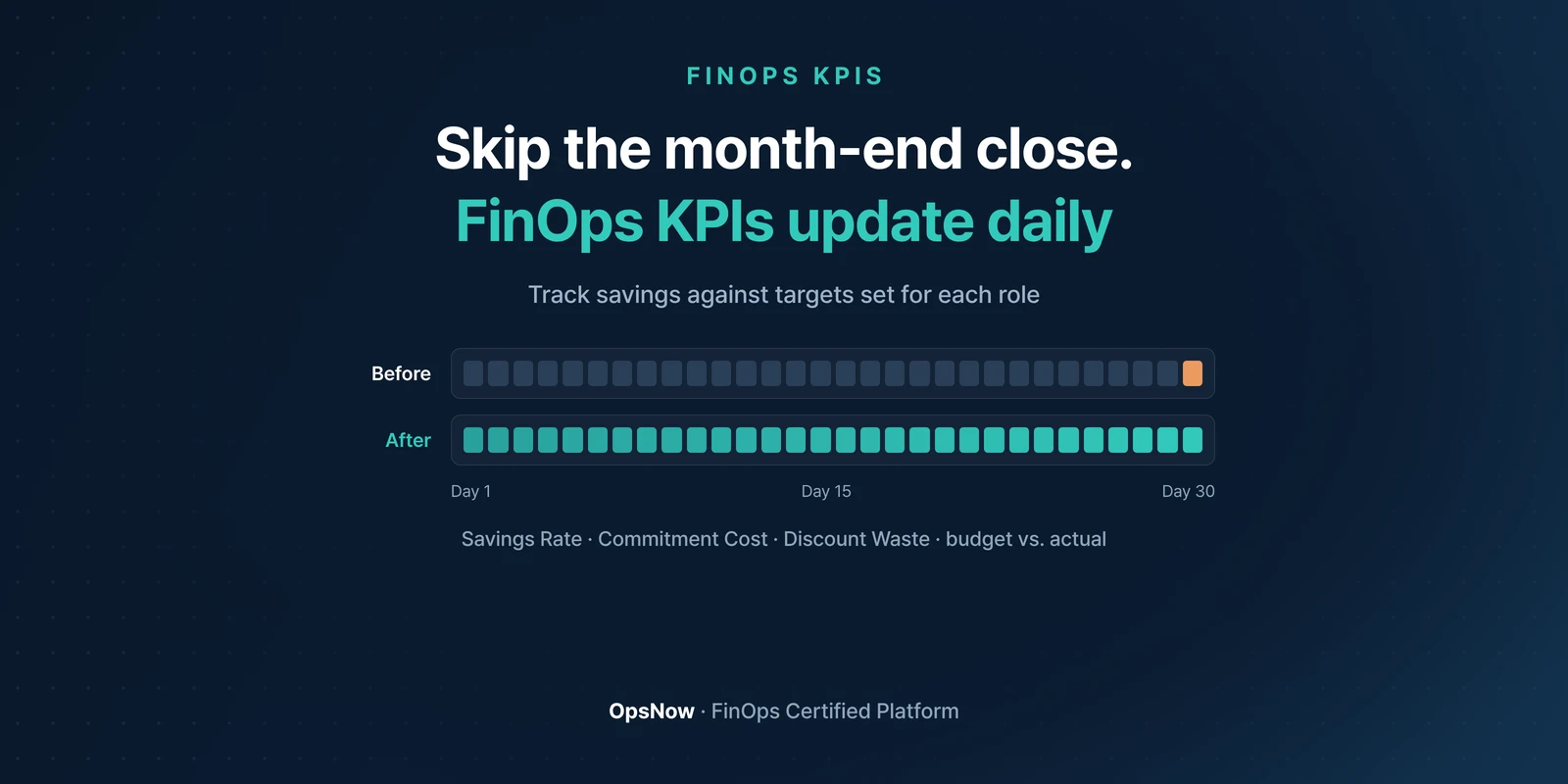
■ Problem: How much your commitments saved, and how much discount went unused, only shows up after the month-end close.
■ Solution: OpsNow FinOps KPIs updates metrics such as Savings Rate, Commitment Cost, Discount Waste and budget vs. actual spend every day, and lets you set different KPIs and targets for each role.
■ Result: Savings you used to calculate once a month by combining bills are now visible in daily-updated metrics, against targets that fit your organization.
On the morning of the third business day of every month, the FinOps lead's spreadsheet gains another tab. Billing data downloaded from each cloud, the commitment utilization report, and the "savings this month" figure worked out by matching the two. The report to leadership goes out with that one cell. By the time the math is done, the number is already about last month. That's why it pays to track FinOps KPIs on their own.
Total cost is visible in any console. What's hard to see is whether your commitments and discounts are pulling their weight.
Say total cost went down this month. If you can't tell whether that's because usage dropped or because you got better discounts, you have no basis for deciding how much to commit next. Total cost alone won't answer that.
OpsNow FinOps KPIs updates metrics such as Savings Rate, Commitment Cost, Discount Waste and budget vs. actual spend every day.
The biggest difference is that you set the criteria. You can set different KPIs for each role (persona), such as finance and engineering, and decide for yourself what counts as hitting the target. The right level for the same Savings Rate varies by industry and role.
You don't need ambitious targets on day one. Recommended values are built in, so you can start with them and adjust as you go. That's why companies new to FinOps can adopt it one step at a time, not just teams that already know the practice.
Looking at one metric alone can mislead you. If Savings Rate rises while Discount Waste grows too, you may have bought more commitment than you need.
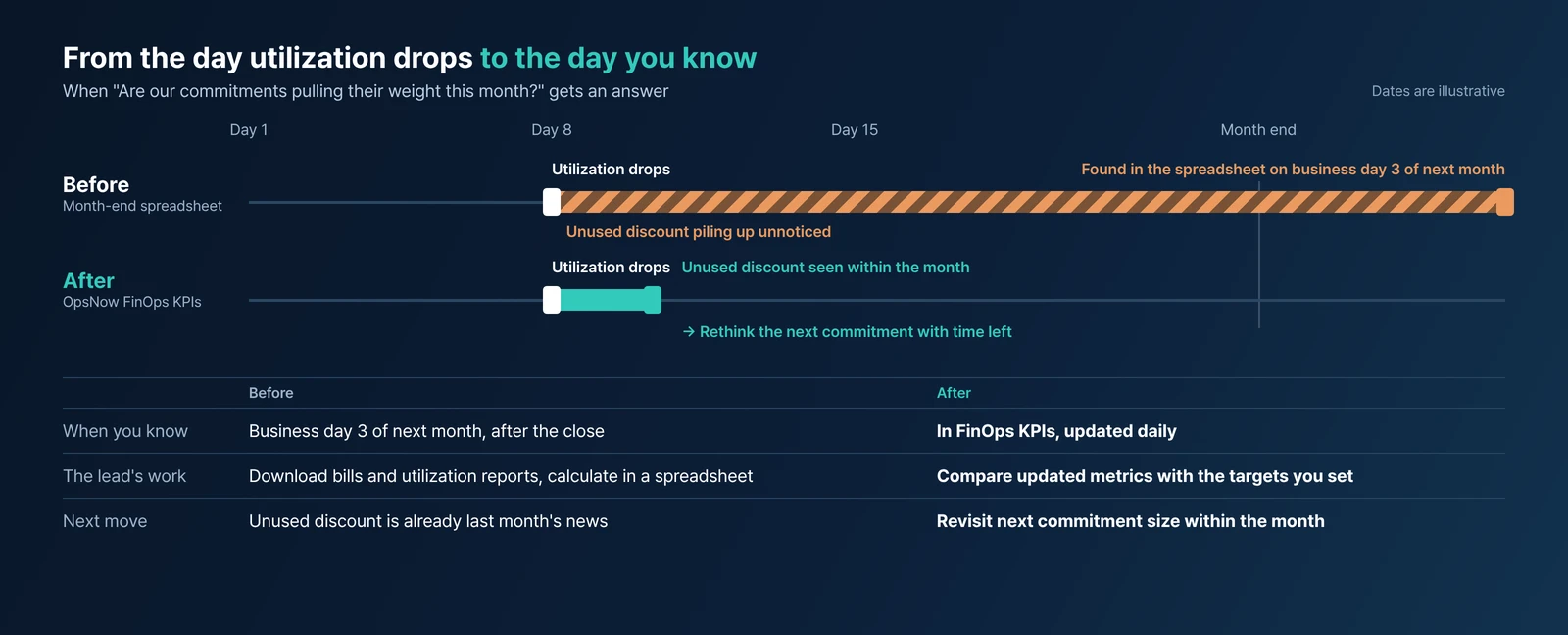
Before, the lead downloads billing data and commitment utilization reports for each cloud and matches them in a spreadsheet. Download, match, calculate: three steps, once a month. If commitment utilization dropped early in the month, the unused discount piling up from that day only shows up in the spreadsheet on the third business day of the following month. By then, the window to act has passed.
After, the same lead opens FinOps KPIs in OpsNow. The metrics update daily, so there's no waiting for month-end. When Discount Waste starts to grow, you see it within the month, along with whether you're falling short of the target you set. You can rethink the size of your next commitment with time left in the month. Reports start from numbers that are already there.
If unused discount has piled up, it's time to revisit the size of your next commitment. OpsNow's commitment recommendations and purchase simulator let you size it before you buy, and if you want the commitment purchase cycle to run on its own, there's AutoSavings.
If spending is climbing fast against budget, it's worth setting up threshold alerts in Budgets as well.
That spreadsheet may still get opened on the third business day next month. But the job that day won't be building the numbers. It will be explaining numbers that are already there.
▶ Talk to OpsNow about your cloud costs
Metrics that measure how efficiently cloud spend is being used. They're the numbers you make decisions with, such as Savings Rate, Commitment Cost and Discount Waste.
Metrics such as Savings Rate, Commitment Cost, Discount Waste and budget vs. actual spend, updated daily. You can set different KPIs and targets for each role.
Savings Rate can look good while Discount Waste grows alongside it. If you only watch Savings Rate, that loss stays hidden.
Yes. Recommended values are built in, so you can start with them and adjust the numbers for your roles and industry as you go.

■ Problem: How much your commitments saved, and how much discount went unused, only shows up after the month-end close.
■ Solution: OpsNow FinOps KPIs updates metrics such as Savings Rate, Commitment Cost, Discount Waste and budget vs. actual spend every day, and lets you set different KPIs and targets for each role.
■ Result: Savings you used to calculate once a month by combining bills are now visible in daily-updated metrics, against targets that fit your organization.
On the morning of the third business day of every month, the FinOps lead's spreadsheet gains another tab. Billing data downloaded from each cloud, the commitment utilization report, and the "savings this month" figure worked out by matching the two. The report to leadership goes out with that one cell. By the time the math is done, the number is already about last month. That's why it pays to track FinOps KPIs on their own.
Total cost is visible in any console. What's hard to see is whether your commitments and discounts are pulling their weight.
Say total cost went down this month. If you can't tell whether that's because usage dropped or because you got better discounts, you have no basis for deciding how much to commit next. Total cost alone won't answer that.
OpsNow FinOps KPIs updates metrics such as Savings Rate, Commitment Cost, Discount Waste and budget vs. actual spend every day.
The biggest difference is that you set the criteria. You can set different KPIs for each role (persona), such as finance and engineering, and decide for yourself what counts as hitting the target. The right level for the same Savings Rate varies by industry and role.
You don't need ambitious targets on day one. Recommended values are built in, so you can start with them and adjust as you go. That's why companies new to FinOps can adopt it one step at a time, not just teams that already know the practice.
Looking at one metric alone can mislead you. If Savings Rate rises while Discount Waste grows too, you may have bought more commitment than you need.
Before, the lead downloads billing data and commitment utilization reports for each cloud and matches them in a spreadsheet. Download, match, calculate: three steps, once a month. If commitment utilization dropped early in the month, the unused discount piling up from that day only shows up in the spreadsheet on the third business day of the following month. By then, the window to act has passed.
After, the same lead opens FinOps KPIs in OpsNow. The metrics update daily, so there's no waiting for month-end. When Discount Waste starts to grow, you see it within the month, along with whether you're falling short of the target you set. You can rethink the size of your next commitment with time left in the month. Reports start from numbers that are already there.

If unused discount has piled up, it's time to revisit the size of your next commitment. OpsNow's commitment recommendations and purchase simulator let you size it before you buy, and if you want the commitment purchase cycle to run on its own, there's AutoSavings.
If spending is climbing fast against budget, it's worth setting up threshold alerts in Budgets as well.
That spreadsheet may still get opened on the third business day next month. But the job that day won't be building the numbers. It will be explaining numbers that are already there.
▶ Talk to OpsNow about your cloud costs
Metrics that measure how efficiently cloud spend is being used. They're the numbers you make decisions with, such as Savings Rate, Commitment Cost and Discount Waste.
Metrics such as Savings Rate, Commitment Cost, Discount Waste and budget vs. actual spend, updated daily. You can set different KPIs and targets for each role.
Savings Rate can look good while Discount Waste grows alongside it. If you only watch Savings Rate, that loss stays hidden.
Yes. Recommended values are built in, so you can start with them and adjust the numbers for your roles and industry as you go.
■ Problem: How much your commitments saved, and how much discount went unused, only shows up after the month-end close.
■ Solution: OpsNow FinOps KPIs updates metrics such as Savings Rate, Commitment Cost, Discount Waste and budget vs. actual spend every day, and lets you set different KPIs and targets for each role.
■ Result: Savings you used to calculate once a month by combining bills are now visible in daily-updated metrics, against targets that fit your organization.
On the morning of the third business day of every month, the FinOps lead's spreadsheet gains another tab. Billing data downloaded from each cloud, the commitment utilization report, and the "savings this month" figure worked out by matching the two. The report to leadership goes out with that one cell. By the time the math is done, the number is already about last month. That's why it pays to track FinOps KPIs on their own.
Total cost is visible in any console. What's hard to see is whether your commitments and discounts are pulling their weight.
Say total cost went down this month. If you can't tell whether that's because usage dropped or because you got better discounts, you have no basis for deciding how much to commit next. Total cost alone won't answer that.
OpsNow FinOps KPIs updates metrics such as Savings Rate, Commitment Cost, Discount Waste and budget vs. actual spend every day.
The biggest difference is that you set the criteria. You can set different KPIs for each role (persona), such as finance and engineering, and decide for yourself what counts as hitting the target. The right level for the same Savings Rate varies by industry and role.
You don't need ambitious targets on day one. Recommended values are built in, so you can start with them and adjust as you go. That's why companies new to FinOps can adopt it one step at a time, not just teams that already know the practice.
Looking at one metric alone can mislead you. If Savings Rate rises while Discount Waste grows too, you may have bought more commitment than you need.
Before, the lead downloads billing data and commitment utilization reports for each cloud and matches them in a spreadsheet. Download, match, calculate: three steps, once a month. If commitment utilization dropped early in the month, the unused discount piling up from that day only shows up in the spreadsheet on the third business day of the following month. By then, the window to act has passed.
After, the same lead opens FinOps KPIs in OpsNow. The metrics update daily, so there's no waiting for month-end. When Discount Waste starts to grow, you see it within the month, along with whether you're falling short of the target you set. You can rethink the size of your next commitment with time left in the month. Reports start from numbers that are already there.

If unused discount has piled up, it's time to revisit the size of your next commitment. OpsNow's commitment recommendations and purchase simulator let you size it before you buy, and if you want the commitment purchase cycle to run on its own, there's AutoSavings.
If spending is climbing fast against budget, it's worth setting up threshold alerts in Budgets as well.
That spreadsheet may still get opened on the third business day next month. But the job that day won't be building the numbers. It will be explaining numbers that are already there.
▶ Talk to OpsNow about your cloud costs
Metrics that measure how efficiently cloud spend is being used. They're the numbers you make decisions with, such as Savings Rate, Commitment Cost and Discount Waste.
Metrics such as Savings Rate, Commitment Cost, Discount Waste and budget vs. actual spend, updated daily. You can set different KPIs and targets for each role.
Savings Rate can look good while Discount Waste grows alongside it. If you only watch Savings Rate, that loss stays hidden.
Yes. Recommended values are built in, so you can start with them and adjust the numbers for your roles and industry as you go.


■ Problem: How much your commitments saved, and how much discount went unused, only shows up after the month-end close.
■ Solution: OpsNow FinOps KPIs updates metrics such as Savings Rate, Commitment Cost, Discount Waste and budget vs. actual spend every day, and lets you set different KPIs and targets for each role.
■ Result: Savings you used to calculate once a month by combining bills are now visible in daily-updated metrics, against targets that fit your organization.
On the morning of the third business day of every month, the FinOps lead's spreadsheet gains another tab. Billing data downloaded from each cloud, the commitment utilization report, and the "savings this month" figure worked out by matching the two. The report to leadership goes out with that one cell. By the time the math is done, the number is already about last month. That's why it pays to track FinOps KPIs on their own.
Total cost is visible in any console. What's hard to see is whether your commitments and discounts are pulling their weight.
Say total cost went down this month. If you can't tell whether that's because usage dropped or because you got better discounts, you have no basis for deciding how much to commit next. Total cost alone won't answer that.
OpsNow FinOps KPIs updates metrics such as Savings Rate, Commitment Cost, Discount Waste and budget vs. actual spend every day.
The biggest difference is that you set the criteria. You can set different KPIs for each role (persona), such as finance and engineering, and decide for yourself what counts as hitting the target. The right level for the same Savings Rate varies by industry and role.
You don't need ambitious targets on day one. Recommended values are built in, so you can start with them and adjust as you go. That's why companies new to FinOps can adopt it one step at a time, not just teams that already know the practice.
Looking at one metric alone can mislead you. If Savings Rate rises while Discount Waste grows too, you may have bought more commitment than you need.
Before, the lead downloads billing data and commitment utilization reports for each cloud and matches them in a spreadsheet. Download, match, calculate: three steps, once a month. If commitment utilization dropped early in the month, the unused discount piling up from that day only shows up in the spreadsheet on the third business day of the following month. By then, the window to act has passed.
After, the same lead opens FinOps KPIs in OpsNow. The metrics update daily, so there's no waiting for month-end. When Discount Waste starts to grow, you see it within the month, along with whether you're falling short of the target you set. You can rethink the size of your next commitment with time left in the month. Reports start from numbers that are already there.

If unused discount has piled up, it's time to revisit the size of your next commitment. OpsNow's commitment recommendations and purchase simulator let you size it before you buy, and if you want the commitment purchase cycle to run on its own, there's AutoSavings.
If spending is climbing fast against budget, it's worth setting up threshold alerts in Budgets as well.
That spreadsheet may still get opened on the third business day next month. But the job that day won't be building the numbers. It will be explaining numbers that are already there.
▶ Talk to OpsNow about your cloud costs
Metrics that measure how efficiently cloud spend is being used. They're the numbers you make decisions with, such as Savings Rate, Commitment Cost and Discount Waste.
Metrics such as Savings Rate, Commitment Cost, Discount Waste and budget vs. actual spend, updated daily. You can set different KPIs and targets for each role.
Savings Rate can look good while Discount Waste grows alongside it. If you only watch Savings Rate, that loss stays hidden.
Yes. Recommended values are built in, so you can start with them and adjust the numbers for your roles and industry as you go.

■ Problem: How much your commitments saved, and how much discount went unused, only shows up after the month-end close.
■ Solution: OpsNow FinOps KPIs updates metrics such as Savings Rate, Commitment Cost, Discount Waste and budget vs. actual spend every day, and lets you set different KPIs and targets for each role.
■ Result: Savings you used to calculate once a month by combining bills are now visible in daily-updated metrics, against targets that fit your organization.
On the morning of the third business day of every month, the FinOps lead's spreadsheet gains another tab. Billing data downloaded from each cloud, the commitment utilization report, and the "savings this month" figure worked out by matching the two. The report to leadership goes out with that one cell. By the time the math is done, the number is already about last month. That's why it pays to track FinOps KPIs on their own.
Total cost is visible in any console. What's hard to see is whether your commitments and discounts are pulling their weight.
Say total cost went down this month. If you can't tell whether that's because usage dropped or because you got better discounts, you have no basis for deciding how much to commit next. Total cost alone won't answer that.
OpsNow FinOps KPIs updates metrics such as Savings Rate, Commitment Cost, Discount Waste and budget vs. actual spend every day.
The biggest difference is that you set the criteria. You can set different KPIs for each role (persona), such as finance and engineering, and decide for yourself what counts as hitting the target. The right level for the same Savings Rate varies by industry and role.
You don't need ambitious targets on day one. Recommended values are built in, so you can start with them and adjust as you go. That's why companies new to FinOps can adopt it one step at a time, not just teams that already know the practice.
Looking at one metric alone can mislead you. If Savings Rate rises while Discount Waste grows too, you may have bought more commitment than you need.
Before, the lead downloads billing data and commitment utilization reports for each cloud and matches them in a spreadsheet. Download, match, calculate: three steps, once a month. If commitment utilization dropped early in the month, the unused discount piling up from that day only shows up in the spreadsheet on the third business day of the following month. By then, the window to act has passed.
After, the same lead opens FinOps KPIs in OpsNow. The metrics update daily, so there's no waiting for month-end. When Discount Waste starts to grow, you see it within the month, along with whether you're falling short of the target you set. You can rethink the size of your next commitment with time left in the month. Reports start from numbers that are already there.

If unused discount has piled up, it's time to revisit the size of your next commitment. OpsNow's commitment recommendations and purchase simulator let you size it before you buy, and if you want the commitment purchase cycle to run on its own, there's AutoSavings.
If spending is climbing fast against budget, it's worth setting up threshold alerts in Budgets as well.
That spreadsheet may still get opened on the third business day next month. But the job that day won't be building the numbers. It will be explaining numbers that are already there.
▶ Talk to OpsNow about your cloud costs
Metrics that measure how efficiently cloud spend is being used. They're the numbers you make decisions with, such as Savings Rate, Commitment Cost and Discount Waste.
Metrics such as Savings Rate, Commitment Cost, Discount Waste and budget vs. actual spend, updated daily. You can set different KPIs and targets for each role.
Savings Rate can look good while Discount Waste grows alongside it. If you only watch Savings Rate, that loss stays hidden.
Yes. Recommended values are built in, so you can start with them and adjust the numbers for your roles and industry as you go.

■ Problem: How much your commitments saved, and how much discount went unused, only shows up after the month-end close.
■ Solution: OpsNow FinOps KPIs updates metrics such as Savings Rate, Commitment Cost, Discount Waste and budget vs. actual spend every day, and lets you set different KPIs and targets for each role.
■ Result: Savings you used to calculate once a month by combining bills are now visible in daily-updated metrics, against targets that fit your organization.
On the morning of the third business day of every month, the FinOps lead's spreadsheet gains another tab. Billing data downloaded from each cloud, the commitment utilization report, and the "savings this month" figure worked out by matching the two. The report to leadership goes out with that one cell. By the time the math is done, the number is already about last month. That's why it pays to track FinOps KPIs on their own.
Total cost is visible in any console. What's hard to see is whether your commitments and discounts are pulling their weight.
Say total cost went down this month. If you can't tell whether that's because usage dropped or because you got better discounts, you have no basis for deciding how much to commit next. Total cost alone won't answer that.
OpsNow FinOps KPIs updates metrics such as Savings Rate, Commitment Cost, Discount Waste and budget vs. actual spend every day.
The biggest difference is that you set the criteria. You can set different KPIs for each role (persona), such as finance and engineering, and decide for yourself what counts as hitting the target. The right level for the same Savings Rate varies by industry and role.
You don't need ambitious targets on day one. Recommended values are built in, so you can start with them and adjust as you go. That's why companies new to FinOps can adopt it one step at a time, not just teams that already know the practice.
Looking at one metric alone can mislead you. If Savings Rate rises while Discount Waste grows too, you may have bought more commitment than you need.
Before, the lead downloads billing data and commitment utilization reports for each cloud and matches them in a spreadsheet. Download, match, calculate: three steps, once a month. If commitment utilization dropped early in the month, the unused discount piling up from that day only shows up in the spreadsheet on the third business day of the following month. By then, the window to act has passed.
After, the same lead opens FinOps KPIs in OpsNow. The metrics update daily, so there's no waiting for month-end. When Discount Waste starts to grow, you see it within the month, along with whether you're falling short of the target you set. You can rethink the size of your next commitment with time left in the month. Reports start from numbers that are already there.

If unused discount has piled up, it's time to revisit the size of your next commitment. OpsNow's commitment recommendations and purchase simulator let you size it before you buy, and if you want the commitment purchase cycle to run on its own, there's AutoSavings.
If spending is climbing fast against budget, it's worth setting up threshold alerts in Budgets as well.
That spreadsheet may still get opened on the third business day next month. But the job that day won't be building the numbers. It will be explaining numbers that are already there.
▶ Talk to OpsNow about your cloud costs
Metrics that measure how efficiently cloud spend is being used. They're the numbers you make decisions with, such as Savings Rate, Commitment Cost and Discount Waste.
Metrics such as Savings Rate, Commitment Cost, Discount Waste and budget vs. actual spend, updated daily. You can set different KPIs and targets for each role.
Savings Rate can look good while Discount Waste grows alongside it. If you only watch Savings Rate, that loss stays hidden.
Yes. Recommended values are built in, so you can start with them and adjust the numbers for your roles and industry as you go.