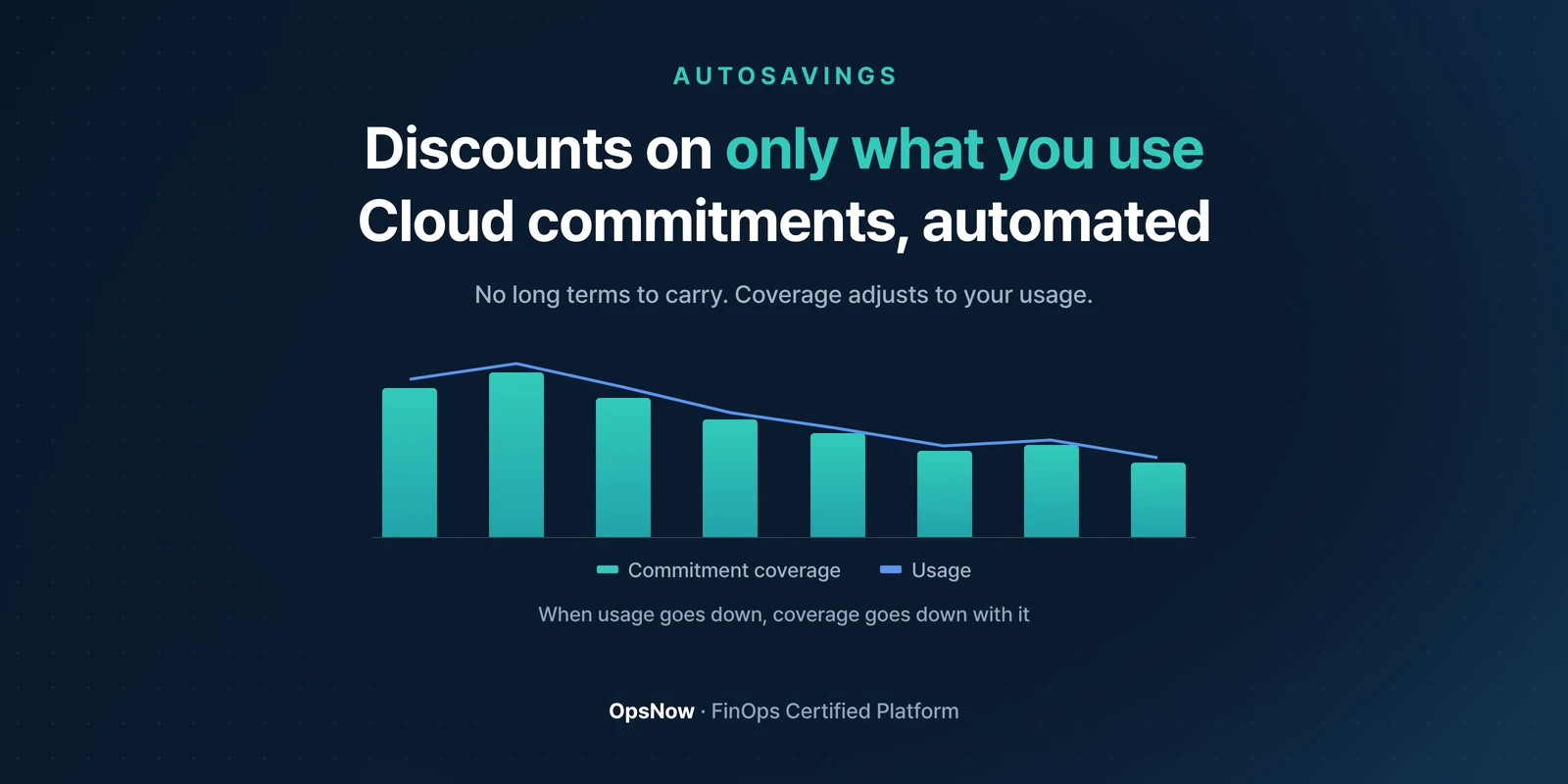
AutoSavings: commitment coverage bars that follow the usage line down
Products

Automating the Cloud Commitment Cycle with AutoSavings

OpsNow Team
2026-09-15

■ Problem: Once you buy a commitment, you can't take it back. If usage drops, you keep paying until it expires.

■ Solution: OpsNow AutoSavings applies the discount without putting that burden on you. When usage goes down, coverage goes down with it.

■ Result: A US company (Company O) cut its average monthly AWS bill by 22% by automatically moving on-demand usage to commitments (a real customer case).

Twelve three-year RIs were all set to expire in the same month, and the infrastructure team found out four days before they did. The person who had put the expiry dates on the calendar had moved to another team the previous quarter. They spent those four days pulling 90 days of usage data and running pivot tables. In the end, they renewed five of the twelve.

The same account had the opposite problem too. Some commitments bought two years earlier were tied to instance types nobody used anymore. Not renewing doesn't fix that. The money keeps going out until the term ends.

A commitment is fixed the moment you buy it

Buying a commitment isn't hard. It takes a few clicks in the console, and with usage data you can work out how much to buy.

The hard part comes after. AWS Savings Plans can be returned only within 7 days of purchase, and only if the hourly commitment is $100 or less. After that window, a one-year or three-year term can't be canceled. Usage shifts every quarter, but the commitment stays put.

So every purchase turns into a bet. Buy too little and you pay on-demand rates. Buy too much and you pay for unused commitment until it expires. That second case even has its own FinOps metric: Discount Waste.

Get discounts only on what you use

Customers using AutoSavings notice three differences.

  • You don't carry one-year or three-year commitments yourself, so your account isn't locked into a long term.
  • When usage drops, coverage drops too. Unused commitment doesn't sit on your bill until expiry.
  • Automation only goes as far as the approval scope you set.

This is where the optimization actually happens. Anyone can buy a commitment. Readjusting it every time usage changes is something the console won't do for you.

Company O used this approach to move on-demand instances to commitments automatically, and its average monthly AWS cost fell 22%. That's a real customer case, and results depend on what gets converted and how usage behaves.
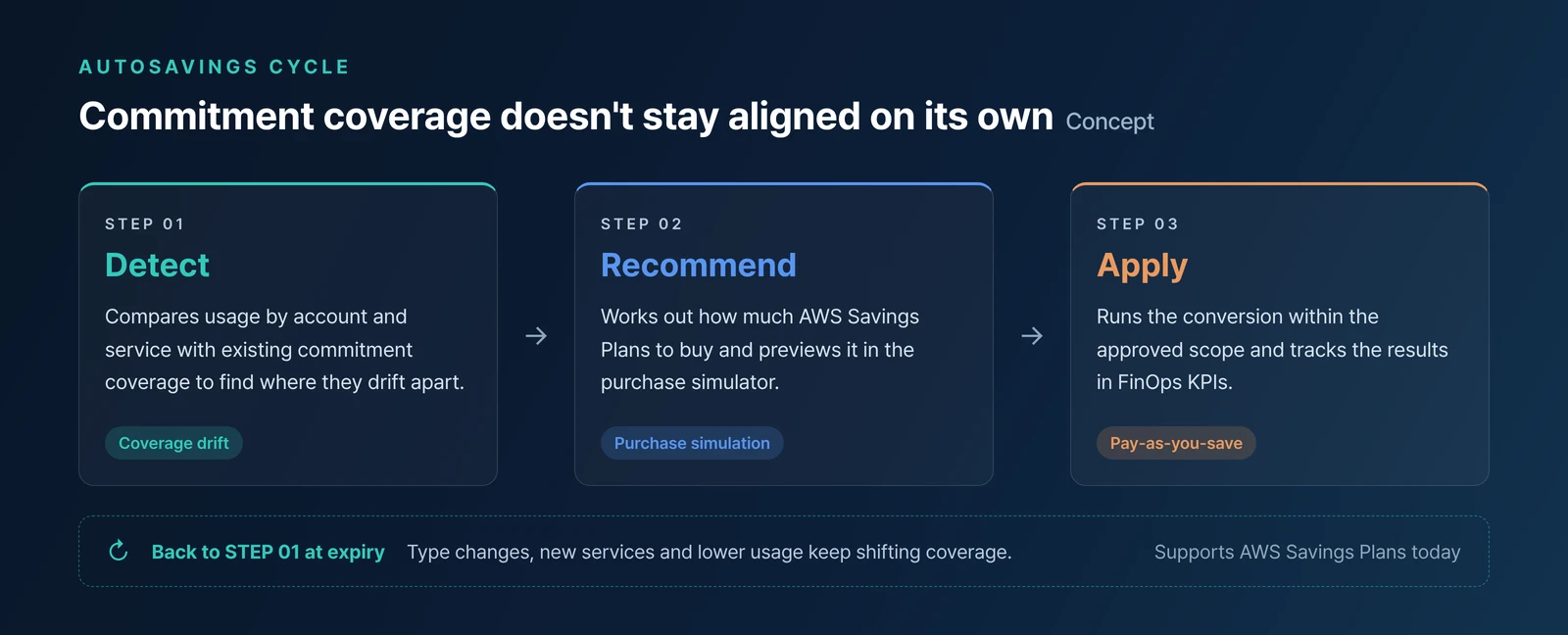
AutoSavings cycle diagram: three steps, Detect, Recommend and Apply, and how commitment coverage changes
Coverage doesn't stay aligned once you set it. When usage moves, it gets realigned.

You pay only when you save

AutoSavings runs on a Pay-as-you-save model. You're charged only when actual savings occur. There's no separate upfront fee to get started.

After it's in place, you track Savings Rate, Commitment Cost and Discount Waste on the FinOps KPIs screen. If coverage slips again, the metrics tell you before the next bill does.

The infrastructure team spent those four days chasing expiry dates. What they never got to was the commitments they had already stopped using, and with commitments you buy yourself, that's always the part left over.

▶ Talk to OpsNow about your cloud costs

Frequently Asked Questions

Q. We can buy commitments ourselves. What's different?

Buying is the same. Unwinding is not. A commitment you buy yourself is fixed until it expires. With AutoSavings, coverage shrinks when usage drops, so you don't keep paying for commitment you no longer use.

Q. Will our account be locked into a one-year or three-year term?

No. You get the discount without taking on the commitment term yourself. OpsNow handles the operation, and you decide how much gets automated.

Q. Does it work with clouds other than AWS?

Today, automatic commitment conversion in AutoSavings supports AWS Savings Plans. Support for Azure, GCP and other CSPs is in preparation. Cost management and visibility already cover five CSPs: AWS, Azure, GCP, OCI and Naver Cloud.

Q. How are we billed?

It's a Pay-as-you-save model. You're charged only when actual savings occur.

Get Started Today with OpsNow

AutoSavings: commitment coverage bars that follow the usage line down
Products

Automating the Cloud Commitment Cycle with AutoSavings

OpsNow Team
2026-09-15

■ Problem: Once you buy a commitment, you can't take it back. If usage drops, you keep paying until it expires.

■ Solution: OpsNow AutoSavings applies the discount without putting that burden on you. When usage goes down, coverage goes down with it.

■ Result: A US company (Company O) cut its average monthly AWS bill by 22% by automatically moving on-demand usage to commitments (a real customer case).

Twelve three-year RIs were all set to expire in the same month, and the infrastructure team found out four days before they did. The person who had put the expiry dates on the calendar had moved to another team the previous quarter. They spent those four days pulling 90 days of usage data and running pivot tables. In the end, they renewed five of the twelve.

The same account had the opposite problem too. Some commitments bought two years earlier were tied to instance types nobody used anymore. Not renewing doesn't fix that. The money keeps going out until the term ends.

A commitment is fixed the moment you buy it

Buying a commitment isn't hard. It takes a few clicks in the console, and with usage data you can work out how much to buy.

The hard part comes after. AWS Savings Plans can be returned only within 7 days of purchase, and only if the hourly commitment is $100 or less. After that window, a one-year or three-year term can't be canceled. Usage shifts every quarter, but the commitment stays put.

So every purchase turns into a bet. Buy too little and you pay on-demand rates. Buy too much and you pay for unused commitment until it expires. That second case even has its own FinOps metric: Discount Waste.

Get discounts only on what you use

Customers using AutoSavings notice three differences.

  • You don't carry one-year or three-year commitments yourself, so your account isn't locked into a long term.
  • When usage drops, coverage drops too. Unused commitment doesn't sit on your bill until expiry.
  • Automation only goes as far as the approval scope you set.

This is where the optimization actually happens. Anyone can buy a commitment. Readjusting it every time usage changes is something the console won't do for you.

Company O used this approach to move on-demand instances to commitments automatically, and its average monthly AWS cost fell 22%. That's a real customer case, and results depend on what gets converted and how usage behaves.

AutoSavings cycle diagram: three steps, Detect, Recommend and Apply, and how commitment coverage changes
Coverage doesn't stay aligned once you set it. When usage moves, it gets realigned.

You pay only when you save

AutoSavings runs on a Pay-as-you-save model. You're charged only when actual savings occur. There's no separate upfront fee to get started.

After it's in place, you track Savings Rate, Commitment Cost and Discount Waste on the FinOps KPIs screen. If coverage slips again, the metrics tell you before the next bill does.

The infrastructure team spent those four days chasing expiry dates. What they never got to was the commitments they had already stopped using, and with commitments you buy yourself, that's always the part left over.

▶ Talk to OpsNow about your cloud costs

Frequently Asked Questions

Q. We can buy commitments ourselves. What's different?

Buying is the same. Unwinding is not. A commitment you buy yourself is fixed until it expires. With AutoSavings, coverage shrinks when usage drops, so you don't keep paying for commitment you no longer use.

Q. Will our account be locked into a one-year or three-year term?

No. You get the discount without taking on the commitment term yourself. OpsNow handles the operation, and you decide how much gets automated.

Q. Does it work with clouds other than AWS?

Today, automatic commitment conversion in AutoSavings supports AWS Savings Plans. Support for Azure, GCP and other CSPs is in preparation. Cost management and visibility already cover five CSPs: AWS, Azure, GCP, OCI and Naver Cloud.

Q. How are we billed?

It's a Pay-as-you-save model. You're charged only when actual savings occur.

Automating the Cloud Commitment Cycle with AutoSavings

■ Problem: Once you buy a commitment, you can't take it back. If usage drops, you keep paying until it expires.

■ Solution: OpsNow AutoSavings applies the discount without putting that burden on you. When usage goes down, coverage goes down with it.

■ Result: A US company (Company O) cut its average monthly AWS bill by 22% by automatically moving on-demand usage to commitments (a real customer case).

Twelve three-year RIs were all set to expire in the same month, and the infrastructure team found out four days before they did. The person who had put the expiry dates on the calendar had moved to another team the previous quarter. They spent those four days pulling 90 days of usage data and running pivot tables. In the end, they renewed five of the twelve.

The same account had the opposite problem too. Some commitments bought two years earlier were tied to instance types nobody used anymore. Not renewing doesn't fix that. The money keeps going out until the term ends.

A commitment is fixed the moment you buy it

Buying a commitment isn't hard. It takes a few clicks in the console, and with usage data you can work out how much to buy.

The hard part comes after. AWS Savings Plans can be returned only within 7 days of purchase, and only if the hourly commitment is $100 or less. After that window, a one-year or three-year term can't be canceled. Usage shifts every quarter, but the commitment stays put.

So every purchase turns into a bet. Buy too little and you pay on-demand rates. Buy too much and you pay for unused commitment until it expires. That second case even has its own FinOps metric: Discount Waste.

Get discounts only on what you use

Customers using AutoSavings notice three differences.

  • You don't carry one-year or three-year commitments yourself, so your account isn't locked into a long term.
  • When usage drops, coverage drops too. Unused commitment doesn't sit on your bill until expiry.
  • Automation only goes as far as the approval scope you set.

This is where the optimization actually happens. Anyone can buy a commitment. Readjusting it every time usage changes is something the console won't do for you.

Company O used this approach to move on-demand instances to commitments automatically, and its average monthly AWS cost fell 22%. That's a real customer case, and results depend on what gets converted and how usage behaves.

AutoSavings cycle diagram: three steps, Detect, Recommend and Apply, and how commitment coverage changes
Coverage doesn't stay aligned once you set it. When usage moves, it gets realigned.

You pay only when you save

AutoSavings runs on a Pay-as-you-save model. You're charged only when actual savings occur. There's no separate upfront fee to get started.

After it's in place, you track Savings Rate, Commitment Cost and Discount Waste on the FinOps KPIs screen. If coverage slips again, the metrics tell you before the next bill does.

The infrastructure team spent those four days chasing expiry dates. What they never got to was the commitments they had already stopped using, and with commitments you buy yourself, that's always the part left over.

▶ Talk to OpsNow about your cloud costs

Frequently Asked Questions

Q. We can buy commitments ourselves. What's different?

Buying is the same. Unwinding is not. A commitment you buy yourself is fixed until it expires. With AutoSavings, coverage shrinks when usage drops, so you don't keep paying for commitment you no longer use.

Q. Will our account be locked into a one-year or three-year term?

No. You get the discount without taking on the commitment term yourself. OpsNow handles the operation, and you decide how much gets automated.

Q. Does it work with clouds other than AWS?

Today, automatic commitment conversion in AutoSavings supports AWS Savings Plans. Support for Azure, GCP and other CSPs is in preparation. Cost management and visibility already cover five CSPs: AWS, Azure, GCP, OCI and Naver Cloud.

Q. How are we billed?

It's a Pay-as-you-save model. You're charged only when actual savings occur.

Download it for free
Submit the information below and get the files you need right away
Name *
Company *
Business Email *
By registering an inquiry, you agree to allow OpsNow to store and process your information for contact purposes.
Please read our Privacy Policy for more information.
Thank you.
The file has been downloaded.
Please enter all required fields.
AutoSavings: commitment coverage bars that follow the usage line down

Automating the Cloud Commitment Cycle with AutoSavings

OpsNow Team
2026-09-15

■ Problem: Once you buy a commitment, you can't take it back. If usage drops, you keep paying until it expires.

■ Solution: OpsNow AutoSavings applies the discount without putting that burden on you. When usage goes down, coverage goes down with it.

■ Result: A US company (Company O) cut its average monthly AWS bill by 22% by automatically moving on-demand usage to commitments (a real customer case).

Twelve three-year RIs were all set to expire in the same month, and the infrastructure team found out four days before they did. The person who had put the expiry dates on the calendar had moved to another team the previous quarter. They spent those four days pulling 90 days of usage data and running pivot tables. In the end, they renewed five of the twelve.

The same account had the opposite problem too. Some commitments bought two years earlier were tied to instance types nobody used anymore. Not renewing doesn't fix that. The money keeps going out until the term ends.

A commitment is fixed the moment you buy it

Buying a commitment isn't hard. It takes a few clicks in the console, and with usage data you can work out how much to buy.

The hard part comes after. AWS Savings Plans can be returned only within 7 days of purchase, and only if the hourly commitment is $100 or less. After that window, a one-year or three-year term can't be canceled. Usage shifts every quarter, but the commitment stays put.

So every purchase turns into a bet. Buy too little and you pay on-demand rates. Buy too much and you pay for unused commitment until it expires. That second case even has its own FinOps metric: Discount Waste.

Get discounts only on what you use

Customers using AutoSavings notice three differences.

  • You don't carry one-year or three-year commitments yourself, so your account isn't locked into a long term.
  • When usage drops, coverage drops too. Unused commitment doesn't sit on your bill until expiry.
  • Automation only goes as far as the approval scope you set.

This is where the optimization actually happens. Anyone can buy a commitment. Readjusting it every time usage changes is something the console won't do for you.

Company O used this approach to move on-demand instances to commitments automatically, and its average monthly AWS cost fell 22%. That's a real customer case, and results depend on what gets converted and how usage behaves.

AutoSavings cycle diagram: three steps, Detect, Recommend and Apply, and how commitment coverage changes
Coverage doesn't stay aligned once you set it. When usage moves, it gets realigned.

You pay only when you save

AutoSavings runs on a Pay-as-you-save model. You're charged only when actual savings occur. There's no separate upfront fee to get started.

After it's in place, you track Savings Rate, Commitment Cost and Discount Waste on the FinOps KPIs screen. If coverage slips again, the metrics tell you before the next bill does.

The infrastructure team spent those four days chasing expiry dates. What they never got to was the commitments they had already stopped using, and with commitments you buy yourself, that's always the part left over.

▶ Talk to OpsNow about your cloud costs

Frequently Asked Questions

Q. We can buy commitments ourselves. What's different?

Buying is the same. Unwinding is not. A commitment you buy yourself is fixed until it expires. With AutoSavings, coverage shrinks when usage drops, so you don't keep paying for commitment you no longer use.

Q. Will our account be locked into a one-year or three-year term?

No. You get the discount without taking on the commitment term yourself. OpsNow handles the operation, and you decide how much gets automated.

Q. Does it work with clouds other than AWS?

Today, automatic commitment conversion in AutoSavings supports AWS Savings Plans. Support for Azure, GCP and other CSPs is in preparation. Cost management and visibility already cover five CSPs: AWS, Azure, GCP, OCI and Naver Cloud.

Q. How are we billed?

It's a Pay-as-you-save model. You're charged only when actual savings occur.

Automating the Cloud Commitment Cycle with AutoSavings

OpsNow Team
2026-09-15

■ Problem: Once you buy a commitment, you can't take it back. If usage drops, you keep paying until it expires.

■ Solution: OpsNow AutoSavings applies the discount without putting that burden on you. When usage goes down, coverage goes down with it.

■ Result: A US company (Company O) cut its average monthly AWS bill by 22% by automatically moving on-demand usage to commitments (a real customer case).

Twelve three-year RIs were all set to expire in the same month, and the infrastructure team found out four days before they did. The person who had put the expiry dates on the calendar had moved to another team the previous quarter. They spent those four days pulling 90 days of usage data and running pivot tables. In the end, they renewed five of the twelve.

The same account had the opposite problem too. Some commitments bought two years earlier were tied to instance types nobody used anymore. Not renewing doesn't fix that. The money keeps going out until the term ends.

A commitment is fixed the moment you buy it

Buying a commitment isn't hard. It takes a few clicks in the console, and with usage data you can work out how much to buy.

The hard part comes after. AWS Savings Plans can be returned only within 7 days of purchase, and only if the hourly commitment is $100 or less. After that window, a one-year or three-year term can't be canceled. Usage shifts every quarter, but the commitment stays put.

So every purchase turns into a bet. Buy too little and you pay on-demand rates. Buy too much and you pay for unused commitment until it expires. That second case even has its own FinOps metric: Discount Waste.

Get discounts only on what you use

Customers using AutoSavings notice three differences.

  • You don't carry one-year or three-year commitments yourself, so your account isn't locked into a long term.
  • When usage drops, coverage drops too. Unused commitment doesn't sit on your bill until expiry.
  • Automation only goes as far as the approval scope you set.

This is where the optimization actually happens. Anyone can buy a commitment. Readjusting it every time usage changes is something the console won't do for you.

Company O used this approach to move on-demand instances to commitments automatically, and its average monthly AWS cost fell 22%. That's a real customer case, and results depend on what gets converted and how usage behaves.

AutoSavings cycle diagram: three steps, Detect, Recommend and Apply, and how commitment coverage changes
Coverage doesn't stay aligned once you set it. When usage moves, it gets realigned.

You pay only when you save

AutoSavings runs on a Pay-as-you-save model. You're charged only when actual savings occur. There's no separate upfront fee to get started.

After it's in place, you track Savings Rate, Commitment Cost and Discount Waste on the FinOps KPIs screen. If coverage slips again, the metrics tell you before the next bill does.

The infrastructure team spent those four days chasing expiry dates. What they never got to was the commitments they had already stopped using, and with commitments you buy yourself, that's always the part left over.

▶ Talk to OpsNow about your cloud costs

Frequently Asked Questions

Q. We can buy commitments ourselves. What's different?

Buying is the same. Unwinding is not. A commitment you buy yourself is fixed until it expires. With AutoSavings, coverage shrinks when usage drops, so you don't keep paying for commitment you no longer use.

Q. Will our account be locked into a one-year or three-year term?

No. You get the discount without taking on the commitment term yourself. OpsNow handles the operation, and you decide how much gets automated.

Q. Does it work with clouds other than AWS?

Today, automatic commitment conversion in AutoSavings supports AWS Savings Plans. Support for Azure, GCP and other CSPs is in preparation. Cost management and visibility already cover five CSPs: AWS, Azure, GCP, OCI and Naver Cloud.

Q. How are we billed?

It's a Pay-as-you-save model. You're charged only when actual savings occur.

AutoSavings: commitment coverage bars that follow the usage line down
Products

Automating the Cloud Commitment Cycle with AutoSavings

OpsNow Team
2026-09-15

■ Problem: Once you buy a commitment, you can't take it back. If usage drops, you keep paying until it expires.

■ Solution: OpsNow AutoSavings applies the discount without putting that burden on you. When usage goes down, coverage goes down with it.

■ Result: A US company (Company O) cut its average monthly AWS bill by 22% by automatically moving on-demand usage to commitments (a real customer case).

Twelve three-year RIs were all set to expire in the same month, and the infrastructure team found out four days before they did. The person who had put the expiry dates on the calendar had moved to another team the previous quarter. They spent those four days pulling 90 days of usage data and running pivot tables. In the end, they renewed five of the twelve.

The same account had the opposite problem too. Some commitments bought two years earlier were tied to instance types nobody used anymore. Not renewing doesn't fix that. The money keeps going out until the term ends.

A commitment is fixed the moment you buy it

Buying a commitment isn't hard. It takes a few clicks in the console, and with usage data you can work out how much to buy.

The hard part comes after. AWS Savings Plans can be returned only within 7 days of purchase, and only if the hourly commitment is $100 or less. After that window, a one-year or three-year term can't be canceled. Usage shifts every quarter, but the commitment stays put.

So every purchase turns into a bet. Buy too little and you pay on-demand rates. Buy too much and you pay for unused commitment until it expires. That second case even has its own FinOps metric: Discount Waste.

Get discounts only on what you use

Customers using AutoSavings notice three differences.

  • You don't carry one-year or three-year commitments yourself, so your account isn't locked into a long term.
  • When usage drops, coverage drops too. Unused commitment doesn't sit on your bill until expiry.
  • Automation only goes as far as the approval scope you set.

This is where the optimization actually happens. Anyone can buy a commitment. Readjusting it every time usage changes is something the console won't do for you.

Company O used this approach to move on-demand instances to commitments automatically, and its average monthly AWS cost fell 22%. That's a real customer case, and results depend on what gets converted and how usage behaves.

AutoSavings cycle diagram: three steps, Detect, Recommend and Apply, and how commitment coverage changes
Coverage doesn't stay aligned once you set it. When usage moves, it gets realigned.

You pay only when you save

AutoSavings runs on a Pay-as-you-save model. You're charged only when actual savings occur. There's no separate upfront fee to get started.

After it's in place, you track Savings Rate, Commitment Cost and Discount Waste on the FinOps KPIs screen. If coverage slips again, the metrics tell you before the next bill does.

The infrastructure team spent those four days chasing expiry dates. What they never got to was the commitments they had already stopped using, and with commitments you buy yourself, that's always the part left over.

▶ Talk to OpsNow about your cloud costs

Frequently Asked Questions

Q. We can buy commitments ourselves. What's different?

Buying is the same. Unwinding is not. A commitment you buy yourself is fixed until it expires. With AutoSavings, coverage shrinks when usage drops, so you don't keep paying for commitment you no longer use.

Q. Will our account be locked into a one-year or three-year term?

No. You get the discount without taking on the commitment term yourself. OpsNow handles the operation, and you decide how much gets automated.

Q. Does it work with clouds other than AWS?

Today, automatic commitment conversion in AutoSavings supports AWS Savings Plans. Support for Azure, GCP and other CSPs is in preparation. Cost management and visibility already cover five CSPs: AWS, Azure, GCP, OCI and Naver Cloud.

Q. How are we billed?

It's a Pay-as-you-save model. You're charged only when actual savings occur.